
Nutanix: Invisible Wires: Agentic Cloud
One substrate, two clouds: leaving an ESXi datacenter for NC2 on Azure and Google Cloud
A large health insurer has to leave its datacenter. The estate is years of ESXi under vCenter: claims adjudication, eligibility and enrollment, the member portal, the provider portal, the EDI gateway that trades X12 claims, remittances and eligibility checks with providers and clearinghouses, document management, reporting batch, and the shared services underneath all of it. The decision is made: NC2 on Azure and NC2 on Google Cloud, both, with the same operating substrate in each (AHV, Prism Central, Flow Virtual Networking). On Azure they want Virtual WAN with Palo Alto inspection in the hub, and they want the same pattern in Google Cloud. They run ServiceNow with a CMDB, and they bring in Cutover for the human side of the migration.
This health insurer is a composite. It isn't any particular plan. I built it from public documentation, not from any customer, and every vendor and regulatory claim below links to the public page I read it on. Where a page didn't say what I needed, I say so. The composite sells Medicare Advantage alongside its commercial plans, because that's what puts a federal calendar on the migration.
The tools aren't really what makes leaving a datacenter hard. Three things do: knowing what moves with what, getting forty people to do the right thing in the right order at 2 a.m., and always having a way back. So this post follows that order. The CMDB says what moves, the dependency map says with what, Cutover says who and when, Nutanix Move does the data, and a hub in each cloud keeps the network and security posture the same on both sides.
The ask says vacate and modernize. This post is the first move only: re-host every VM onto the same substrate in the cloud it belongs in, unchanged, on a schedule the datacenter exit controls. Modernization is the second move, application by application, after the exit, on a schedule the application teams control. Doing both at once doubles the change to every application and ties the exit date to the slowest refactor. That's the same reasoning as in Leaving GCVE for NC2 on Google Cloud, and I won't repeat it here.
What I checked before drawing anything
Four parts of the ask needed checking against the documentation before any diagram. Here's what I found, up front, because two of them change the design.
- Azure Virtual WAN with Palo Alto in the hub: supported, with conditions. Nutanix documents NC2 on Azure behind a secured vWAN hub, with routing intent and "Palo Alto Networks SaaS firewall" as the example. In a vWAN hub that means Cloud NGFW, not VM-Series. The Nutanix procedure is written with site-to-site VPN into the hub, not ExpressRoute.
- "The same pattern in Google Cloud": the substrate yes, the hub no. Nutanix's Google Cloud guide doesn't mention Network Connectivity Center, Palo Alto or any third-party firewall. NC2 on Google Cloud publishes overlay routes as static routes, not BGP, and that decides the hub design: a peering hub with Palo Alto VM-Series, documented by Google and Palo Alto and applied to NC2 by me.
- Flow Network Security on NC2 on Google Cloud: not confirmed. It's documented for NC2 on Azure. I couldn't find it in any public NC2 on Google Cloud page, and the deployment page in the Flow Network Security guide lists only NC2 on AWS and Azure. That doesn't mean it's unsupported. It means it's not a design dependency until the compatibility matrix says so.
- One Prism Central: no. Each NC2 cluster registers to a new Prism Central or an existing one in the same region. Each cloud gets its own. Same substrate, two control planes.
And one name: the company is Cutover, at cutover.com. The cutover.net domain didn't resolve when I checked on October 7, 2026.
What makes it a health plan migration
Three things change the plan once the estate belongs to a health insurer. Each comes from a public rule or standard, and the mapping to this design is mine.
The calendar. Medicare Advantage enrollment runs on dates set in regulation. 42 CFR 422.62 says "Beginning in 2011, the annual coordinated election period for the following calendar year is October 15 through December 7." Medicare.gov's Joining a plan page calls the same dates the Open Enrollment Period, and says coverage chosen then starts "January 1 of the next year (the plan must get your request to join by December 7)." A separate Medicare Advantage Open Enrollment Period runs January 1 to March 31 for people already in a plan. As I write this, the election period for 2027 opens in eight days. The dates are CMS's. That member-facing, enrollment and eligibility load concentrates around them is my planning assumption, not a sourced number, and it sets the rule I'd use: no wave that touches the member portal, enrollment, eligibility or claims from October 15 until the January 1 changes have settled. Back-office and reporting groups can move then; the member-facing ones move in the spring and summer.
The EDI. A health plan's front door for providers is X12. The X12 transaction set list describes the 837 as health care claim billing and encounter information "from providers of health care services to payers, either directly or via intermediary billers and claims clearinghouses," the 835 as a payment or Explanation of Benefits remittance advice "from a health insurer to a health care provider," and the 270 and 271 as the eligibility, coverage or benefit inquiry and the information sent back. HIPAA makes these the required formats: 45 CFR Part 162 adopts the version 5010 reports (005010X222 and 005010X223 for professional and institutional claims, 005010X221 for the 835, 005010X279 for the 270/271). Section 162.1203 also adopts CAQH CORE operating rules for eligibility, including an "Eligibility and Benefits Real Time Response Rule" and an "Eligibility and Benefits System Availability Rule." I didn't open the rule texts, so I give no numbers here. The design point is that the eligibility service's downtime is governed by an adopted operating rule, not only by an internal service level, so its cutover window gets checked against that rule's scheduled-downtime terms before the wave is booked.
The evidence. The HIPAA Security Rule (45 CFR Part 164, Subpart C) applies to health plans, and four of its provisions land on a datacenter exit:
- Evaluation, 164.308(a)(8): a periodic evaluation "in response to environmental or operational changes affecting the security of electronic protected health information." Moving every system that holds ePHI to two clouds is that kind of change, so the risk analysis gets updated before wave 0, not after the last wave.
- Contingency plan, 164.308(a)(7)(ii)(A): a data backup plan is Required, "procedures to create and maintain retrievable exact copies of electronic protected health information." That turns the Move snapshot trap below from an inconvenience into a compliance item.
- Audit controls, 164.312(b): "mechanisms that record and examine activity in information systems that contain or use electronic protected health information." The runbook's audit log, the change records and the CMDB updates are the migration's share of that record.
- Documentation, 164.316(b)(2)(i): documentation the rule requires is kept "for 6 years from the date of its creation or the date when it last was in effect, whichever is later." That covers the risk analysis, the evaluation and the policies, not every raw log line. Decide where the migration's records live before wave 0, because the tools that produced them may be gone before the six years are.
HHS's Guidance on HIPAA and Cloud Computing adds the contract side: a cloud provider that stores or processes ePHI for a covered entity "is a business associate under HIPAA," and that "is true even if the CSP processes or stores only encrypted ePHI and lacks an encryption key for the data." So a business associate agreement with each cloud is a precondition, and which of the services in this design each agreement covers (including a partner SaaS firewall in the Azure hub) is a validation item for the plan's privacy office, not something I could confirm. The simplest position for the migration tooling is to keep ePHI out of runbook tasks and CMDB records altogether. HHS's Summary of the HIPAA Security Rule describes the rule currently in effect and links to OCR's proposed modifications; if those are finalized during the program, the evidence list gets re-read.
The estate, before and after
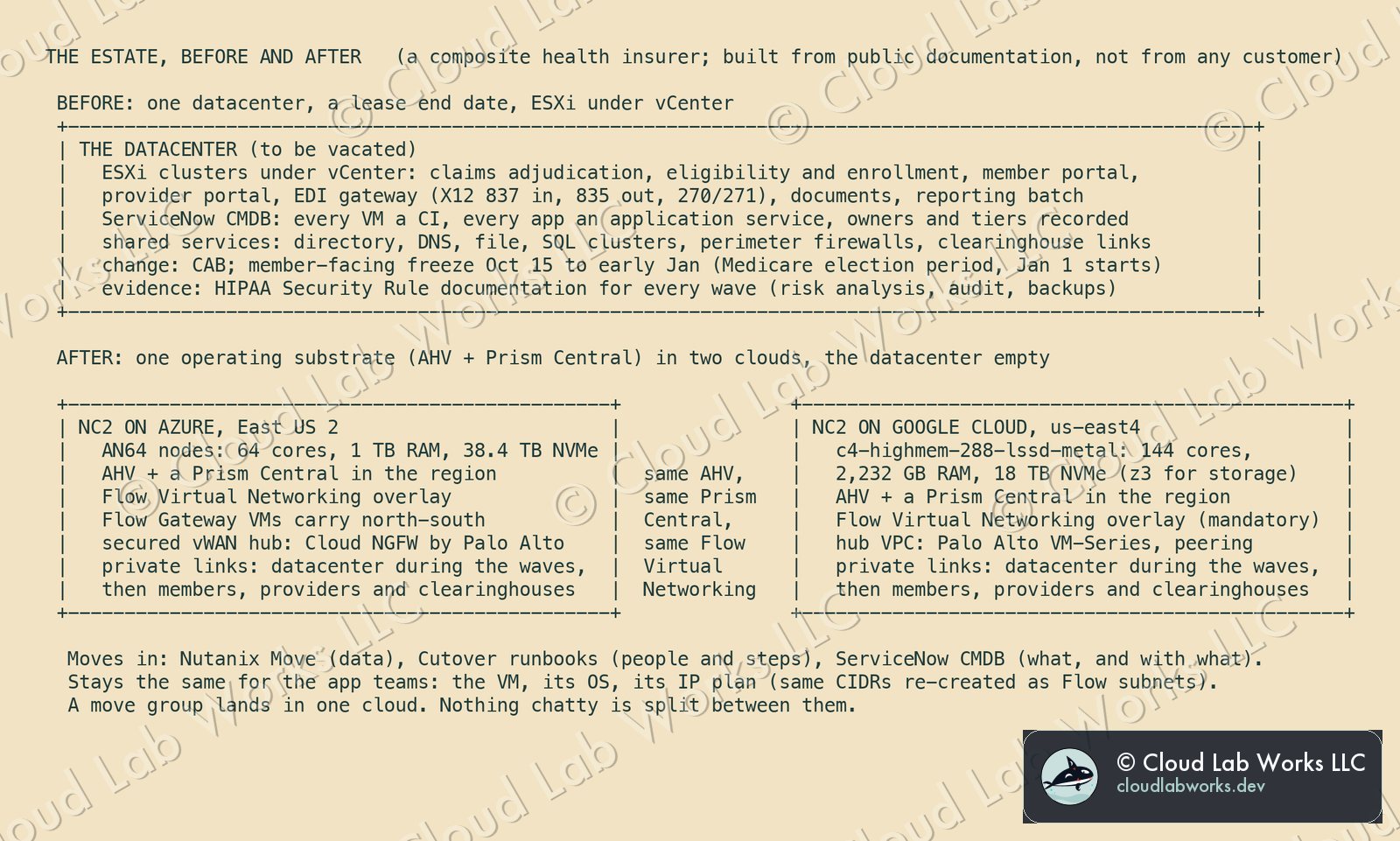
The ask was the largest bare-metal shapes, and each cloud's guide has one clear answer:
| NC2 on Azure | NC2 on Google Cloud | |
|---|---|---|
| Largest shape | AN64 | c4-highmem-288-lssd-metal |
| Cores / vCPUs | 64 / 128 | 144 / 288 |
| Memory | 1 TB | 2,232 GB |
| Local storage | 38.4 TB (5 x 7.68 TB NVMe) | 18,000 GB (6 x 3 TB) |
| Storage-heavy alternative | none larger | z3-highmem-192-highlssd-metal: 96 cores, 1,536 GB, 12 x 6 TB NVMe |
| Region pairing in this design | East US 2 (AN64 in two zones only) | us-east4 |
Both guides say the vCPU figure is the cloud's billing and quota count, not a scheduling limit. Both cap a cluster at 28 nodes. On Google Cloud the node type is fixed at creation. One version trap: the NC2 on Google Cloud release notes list a known issue where creating a cluster with C4 bare-metal instances fails on AOS 7.6, with AOS 7.5.1.x as the workaround. Pin the AOS version in the platform runbook, and check that note against the supported versions on the day you build.
Which cloud each application lands in
Two clouds means one more decision per application, and it has to be made before the waves, not during them. The rule I'd use is short:
- Follow the data and the services. An application that already leans on Azure-native services lands on NC2 on Azure. One that leans on Google Cloud data and AI services lands on NC2 on Google Cloud.
- Keep the chatty together. A move group lands in one cloud, whole, and so do its subnets: a CIDR is routed in one place at a time. The dependency map is what makes this enforceable: if two groups talk constantly, they're one group, or two groups in the same cloud.
- Shared services land in both, or stay reachable from both. Directory and DNS are needed on both sides from wave 0. A shared SQL cluster used by applications headed to both clouds is a design problem to solve on paper (split it, or pick a side and move its consumers there), never a surprise during a cutover.
- Workloads that depend on east-west rules inside a segment go where per-VM policy is confirmed. Today that's Azure. More on that in the parity section.
I didn't design any cross-cloud application traffic into this, and I'd keep it that way. Nutanix's disaster recovery documentation covers NC2 to NC2 within the same cloud. I found no row for Azure to Google Cloud, so the two estates are peers on the same substrate, not halves of one application.
One link between the clouds is still needed, and it's easy to miss. Domain controllers in both clouds replicate with each other, and so do DNS and whatever monitoring and backup tooling spans the estate. During the waves that traffic crosses the datacenter. When the datacenter is empty, nothing carries it. A private Azure to Google Cloud path, inspected by both hubs, is an open design item for this estate, and it has to exist before the last wave, not after.
Steps 1 and 2: the CMDB says what, the dependency map says with what
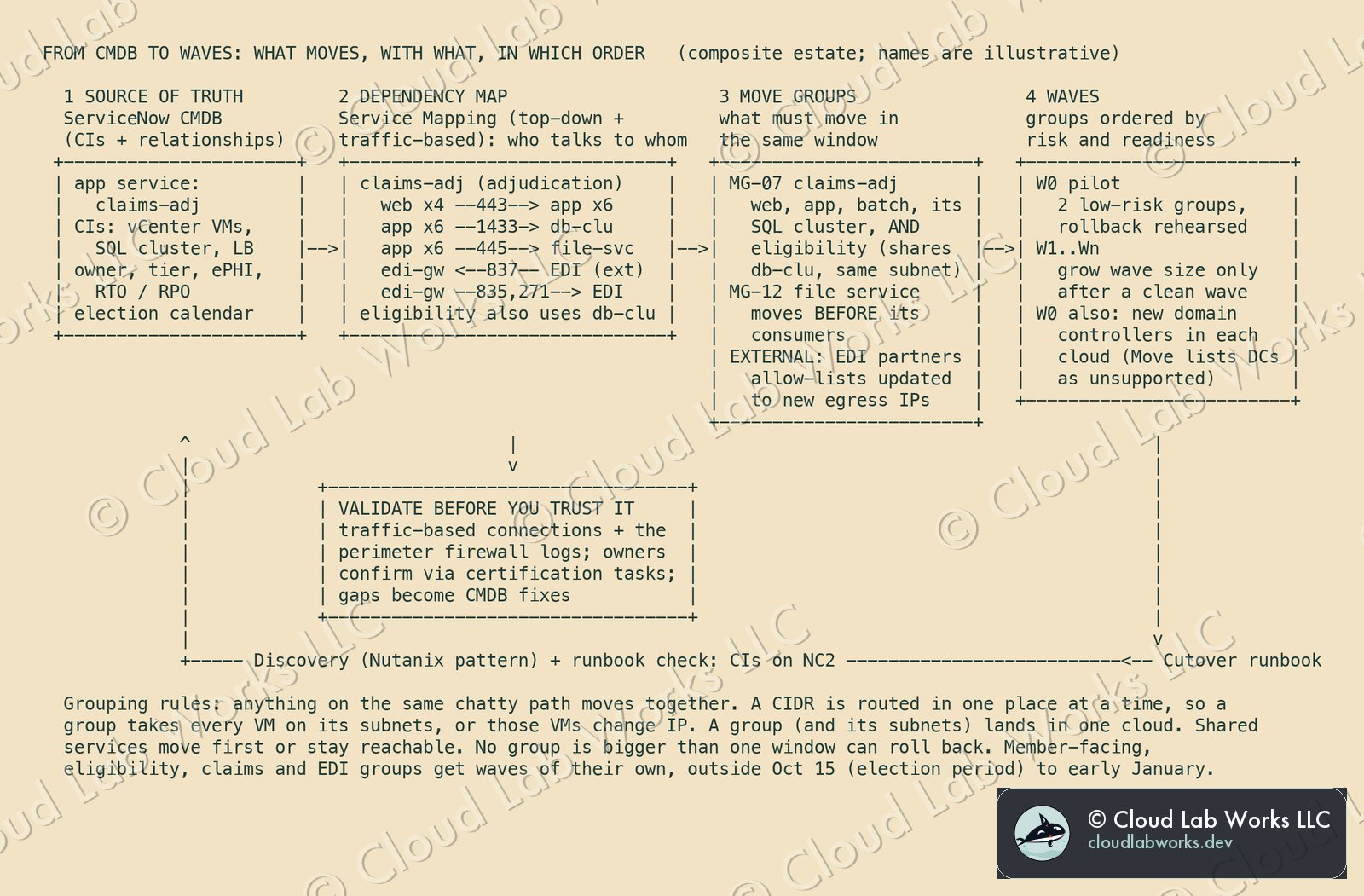
The CMDB is the scope. If a VM isn't a CI in an application service, it doesn't get a wave, and that's how the team finds the orphans before the lease does. ServiceNow Discovery already knows the source side: "Discovery gathers information about virtual machines managed by VMware vCenter," and a VMware schedule "discovers vCenter and ESX hosts." The CMDB Health dashboard scores completeness, correctness, compliance and relationships. Run it before planning starts, and make its relationship score the first gate. A CMDB with weak relationships produces a confident, wrong wave plan.
Service Mapping turns CIs into applications. In ServiceNow's words, it "discovers all application services in your organization and builds a comprehensive map of all devices, applications, and configuration profiles used in these application services." Two of its methods matter here. Top-down discovery starts from an entry point ("usually, either a URL or a combination of the IP address and port") and follows the patterns from there. Traffic-based mapping "analyzes network traffic to automatically discover connections between CIs," using "commands and network flow logs." Top-down finds what the application is built from. Traffic-based finds what it actually talks to, which is the half that breaks cutovers.
The relationships are the move-group logic. Runs on::Runs ties an application to its host, Depends on::Used by ties an application to another application, and Virtualized by::Virtualizes ties a VM to its ESXi host. A move group is a set of applications closed under Depends on::Used by for anything chatty, plus everything those applications Run on.
No product I read builds the waves for you. I looked for ServiceNow or Cutover documentation that turns dependency maps into move groups and waves, and found none. ServiceNow's Cloud Migration Assessment is marked "no longer deployed, enhanced, or supported," and the Enterprise Architecture cloud assessment scores readiness, not grouping. So the grouping is a method the migration team owns, with the CMDB as its input. The method in the diagram:
- Validate before you trust it. Compare the traffic-based connections with the perimeter firewall logs. Then have each application owner confirm the map through Data Certification tasks, which "are automatically created and assigned." Every gap the owner finds becomes a CMDB fix, not a note in a spreadsheet.
- Group by the chatty path. Web, app, batch and the database they hammer move together. For claims adjudication that means the adjudication engine, its batch and the claims database. Shared services move first or stay reachable. Clearinghouses and other trading partners get their allow-lists updated to the new egress addresses before the wave, not during it.
- Group by the subnet, too. This design keeps IP addresses: each source segment is re-created as a Flow subnet with the same CIDR, and the wave's network change is moving that CIDR's route. A CIDR can only be routed in one place at a time, so a move group takes every VM on its subnets, or those VMs change IP at cutover. In the diagram, the eligibility service shares the claims database and its subnet, so it joins MG-07 rather than splitting the cluster. Move can assign new addresses (its custom IP option is qualified for RHEL 7 and later, Windows 10 and 11, and Windows Server 2008 R2 to 2022), but every re-IP is an application change, and this design avoids them. Both NC2 guides also document Layer 2 subnet extension, which keeps one subnet live on both sides. It's documented between Nutanix sites and third-party VTEP devices, and I didn't design on it for an ESXi source.
- Order by risk and by the calendar. Wave 0 is two low-risk groups (internal tools with no member traffic) and a rehearsed rollback. Waves get bigger only after a clean wave. Member-facing groups (the member portal, the provider portal), eligibility and enrollment, claims adjudication and the EDI gateway get waves of their own (no back-office groups mixed in), scheduled outside October 15 to early January.
- Directory is a build, not a move. Nutanix Move lists domain controllers as unsupported for guest preparation. Build new domain controllers in each cloud in wave 0, and retire the old ones last.
The CMDB has to be right on the far side, too. ServiceNow Discovery has a Nutanix pattern that finds "components of the Nutanix Acropolis solution containing Nutanix Prism Central version 2024.3.1.8 or Nutanix Prism Element 7.0.1.6," supports Nutanix v4 discovery from pattern version 1.29.0, and has VM and host event patterns that rediscover on state change. I didn't find it documented for NC2 by name. NC2 runs the same Prism Central, so pointing Discovery at each cloud's Prism Central is the obvious first test. Either way, the CI update after a wave is a runbook task with an owner: rediscover, re-run the service map, check it, then close the change.
Step 3: Cutover runs the people
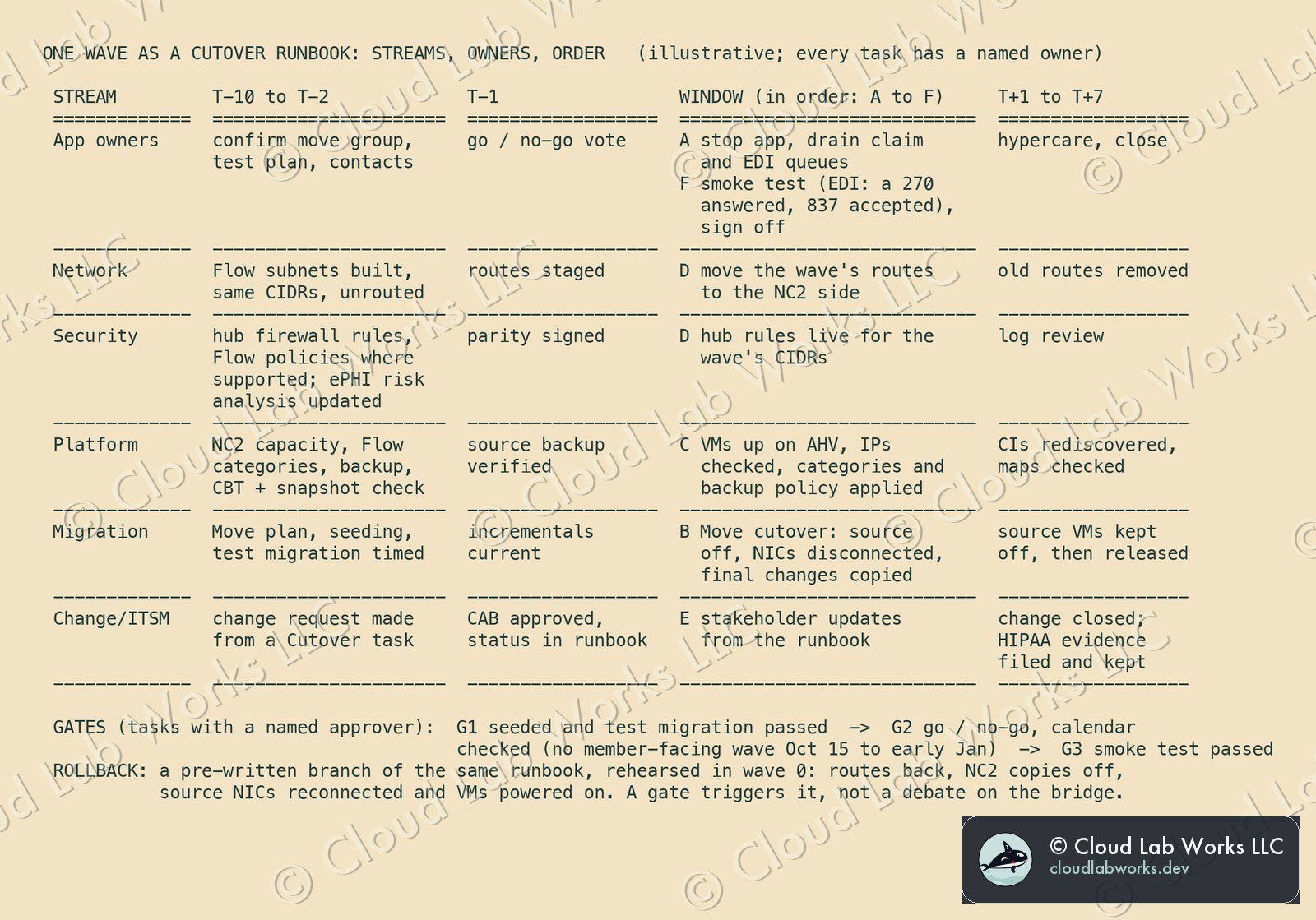
The health plan's real risk on the night is people, not bytes. Cutover's Migrate page describes the shape of the answer. Waves are "linking parent and child automated runbooks" for "large-scale migration waves." The plan lets you "visualize the mapping of migration task dependencies" and "view the critical path including milestones and upstream/downstream dependencies," with "pre-approved runbook templates by application type" and real-time dashboards. The runbook features add a node map to "identify parallel tasks and dependencies, manage the critical path," and "the immutable and auto-generated audit log." For a health plan, that audit log is half the reason to use it: it's a record of who did what to systems that hold ePHI, which is the kind of activity the Security Rule's audit controls standard (164.312(b)) is about. Whether it satisfies that standard for a given plan is the compliance team's call, not mine.
How I'd set it up:
- One parent runbook for the program, one child runbook per wave, built from a template per application type. The wave runbook in the diagram has six streams (app owners, network, security, platform, migration, change). Every task has an owner and a predecessor. Nobody on the bridge asks "can I go now?" because the runbook already answers it.
- ServiceNow stays the system of record for change. Cutover's ServiceNow integration can "Create change requests/incidents in ServiceNow from a Cutover task," "View the latest status of a change request in Cutover," and "automatically pull important configuration item (CI) data into Cutover as a task or auto-generate a Cutover runbook based on ServiceNow tickets." Cutover's developer docs show it as a custom integration on ServiceNow's Table API with an API token. I couldn't check the ServiceNow Store. The Application Metastore aggregates application data, "including configuration management database (CMDB) data, to automate the creation of migration and recovery runbooks."
- Gates are tasks with approvers. G1 is seeding complete and a passed test migration. G2 is go/no-go, and it includes the calendar check (no member-facing, eligibility or claims wave inside the election period). G3 is a passed smoke test, which for the EDI gateway means a test 270 answered with a 271 and a test 837 accepted from a clearinghouse. Each has a named approver, so a failed gate starts the rollback branch without a debate.
- Rollback is written, not improvised. I didn't find a rollback feature in Cutover's public pages, and the design doesn't need one. The rollback is a branch of the same runbook (tasks, owners, predecessors), rehearsed in wave 0 like everything else.
What I didn't find documented: Cutover features named "streams" or "roles" (I use "streams" as plain English), and rehearsals for migration (Cutover's public rehearsal language is on its recovery product). The rehearsal in this design is Move's test migration, run as tasks in the wave runbook.
Step 4: Move does the data, on a clock
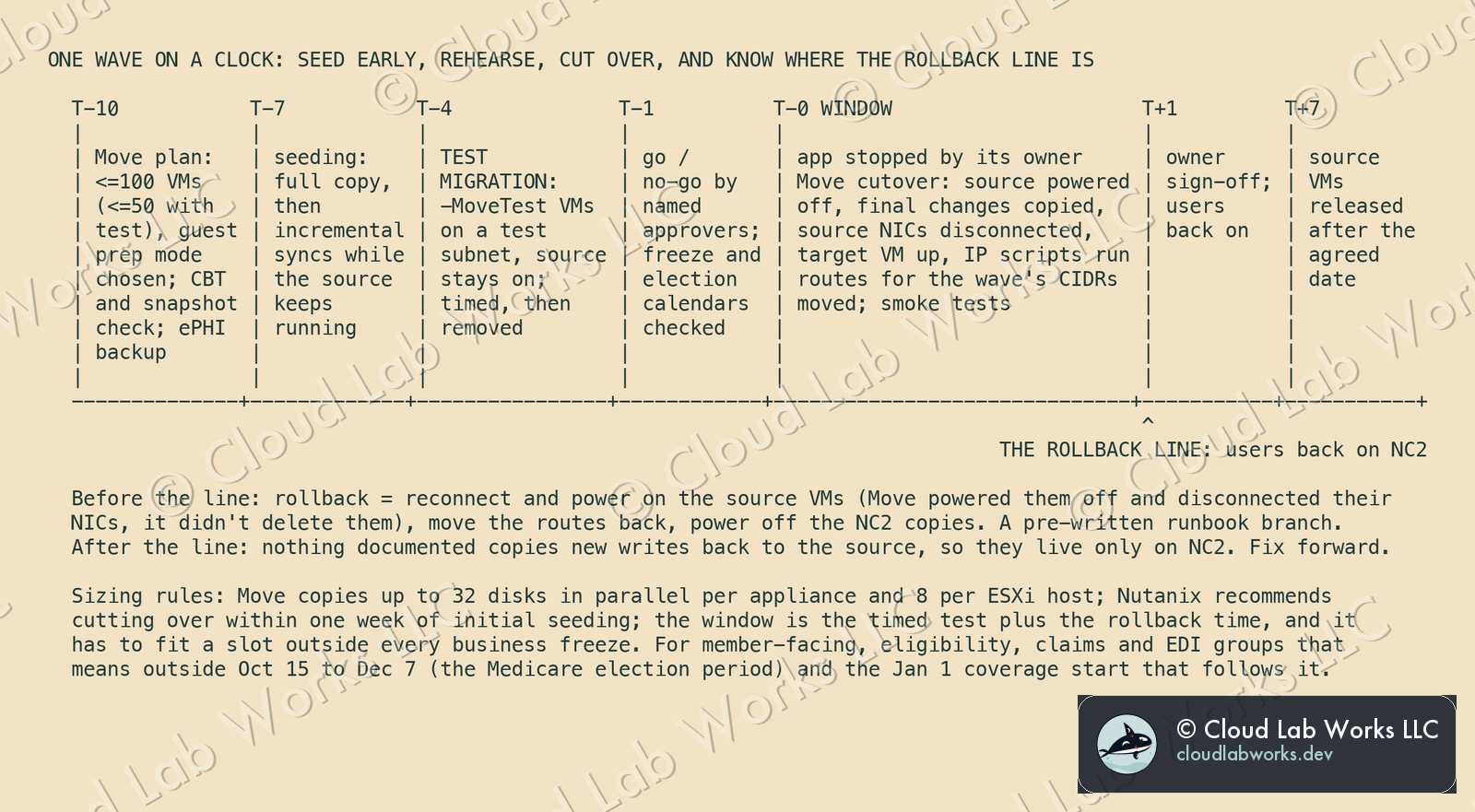
The Nutanix Move 6.3 user guide lists "VMware ESXi to NC2 on Microsoft Azure" and "VMware ESXi to NC2 on Google Cloud" among its migration paths, and Nutanix's NC2 on Google Cloud tech note says the same from the other side: "Use Nutanix Move to migrate VMs from existing environments (ESXi, Hyper-V, or on-premises AHV) to NC2 on Google Cloud." The source has to be ESXi 6.5 or later, and VMs need hardware version 7 or later for Changed Block Tracking (CBT).
One scope caveat: several pages in the 6.3 guide (creating a migration plan, requirements, limitations) are headed "ESXi to Nutanix AHV and ESXi to NC2 on AWS." The NC2 on Azure and NC2 on Google Cloud paths are named on the overview, the ESXi-to-NC2 page and the cutover page. Treat the plan-level limits below as the documented baseline and confirm them for your target cloud.
Where Move runs. The guide's general rule puts Move on the destination cluster, with an exception when source and target are far apart or latency is above 200 ms. Its deployment recommendations say that for on-premises to NC2 over a WAN, "Nutanix recommends that you deploy Nutanix Move on the source environment." For Google Cloud, a public Nutanix KB told Move 6.0.1 to 6.1.3 users not to deploy on the NC2 cluster, and says that from 6.2.0 "the Move appliance will take care of this workflow automatically." The 6.3 guide doesn't restate placement for Google Cloud. This design runs Move in the datacenter, on the source side, and confirms placement for each cloud in wave 0.
The model, as the guide describes it:
- Plans and seeding. "You can create a migration plan to seed the data, cutover, and monitor the VMs." Seeding is a full copy, then incremental syncs from CBT while the source keeps running. "Nutanix recommends that you perform the cutover within one week of initial data seeding," so seeding starts days, not weeks, before the window.
- A trap in seeding. "If CBT is not enabled on the source VM, Nutanix Move enables it, which results in the deletion of the existing snapshots on the source VM. VM snapshot deletion is irreversible." Check CBT and take the backup you trust before the plan starts. It's in the platform stream at T-10. For a health plan this is the Security Rule's data backup plan, the "retrievable exact copies" in 164.308(a)(7)(ii)(A), so the backup is verified restorable, not only taken.
- The rehearsal. In a test migration "the source VMs remain powered on and a test VM will be created in the target environment," suffixed "-MoveTest," with a test subnet field for NC2 on Azure. Time it. That time, plus the rollback time, sizes the window.
- The cutover. Move "powers off the source VM to maintain data consistency," copies the final changes, adds a note to the source VM in vCenter, "disconnects the source VM network interfaces to prevent network conflicts," creates and powers on the target VM, and runs the scripts that configure static IPs. IP retention is on by default and best effort. The guide says to verify it, and warns that VMs with more than one NIC might not keep every address.
- Guest preparation. Automatic, manual or mixed. Manual preparation installs the VirtIO drivers, runs the IP retention and SAN policy scripts, and uninstalls VMware Tools. Windows VMs with third-party antivirus running, domain controllers and Exchange Server are unsupported for guest operations. Those get their own plan: rebuild, or a vendor-supported method.
Wave sizing comes from the documented limits. Move "migrates maximum of 8 disks from single ESXi hosts in parallel" and "the limit is 32 disks in parallel at the appliance level." At cutover it "allocates a maximum of 10 slots per host," and a VM takes one slot per disk. A plan holds up to 100 VMs, or 50 when it uses test migration. The wave size is whatever fits those numbers and the timed test, not the size of the application list.
Where the rollback line is. Move doesn't delete the source. It powers it off, disconnects its NICs and leaves it there. Until users are back on, rollback is a reverse branch of the runbook: power off the NC2 copies, move the routes back, reconnect and power on the source. Nothing in Move's cutover documentation copies writes made on NC2 back to the source, so once users write to NC2, those writes live only there. That makes go-live the rollback line, and it's why the smoke test (G3) comes before users, not after.
Azure: the vWAN hub is documented, with conditions
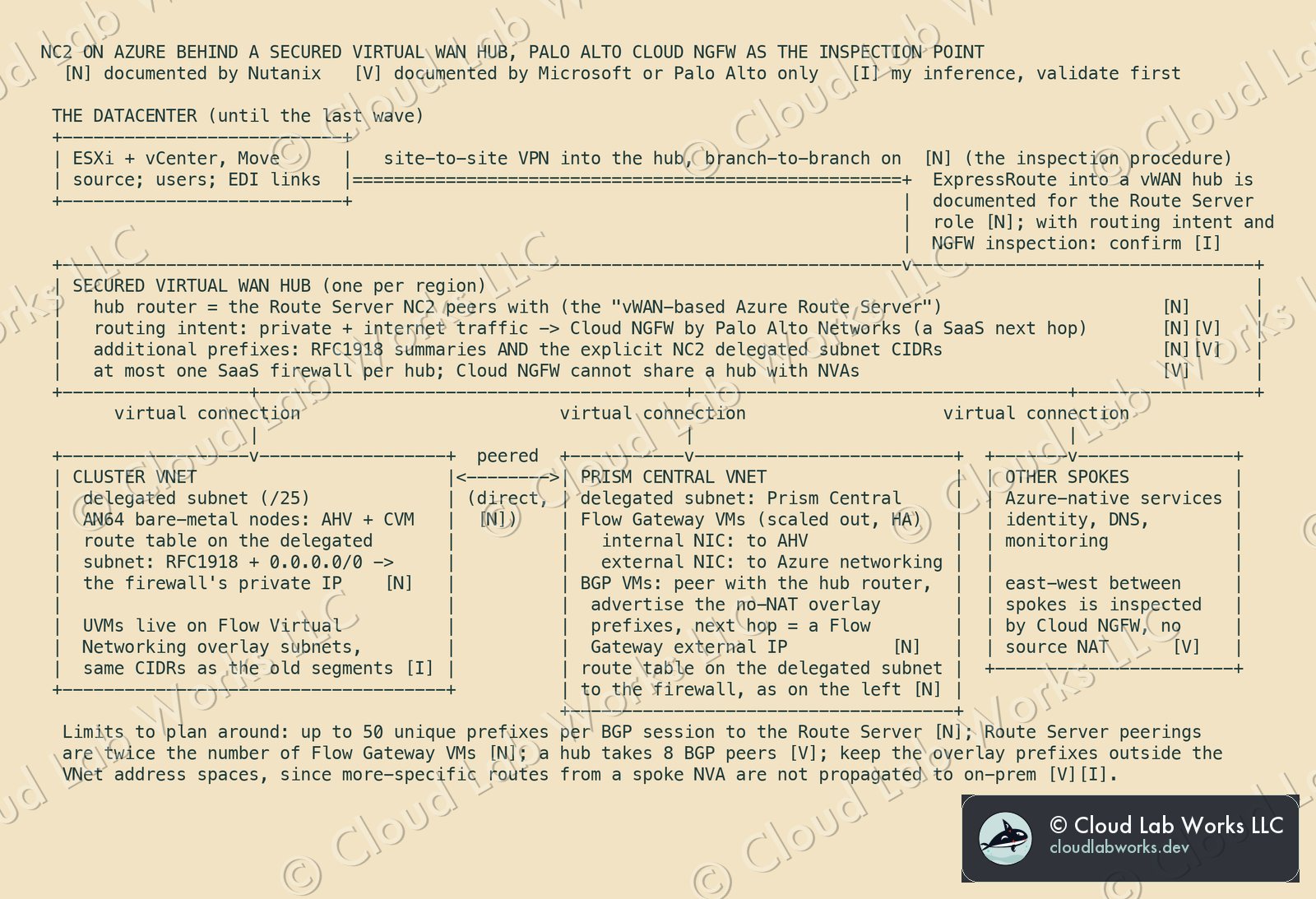
This is the part I expected to walk back, and didn't. The NC2 on Azure Deployment and User Guide (edition of October 5, 2026) supports Virtual WAN in three places that matter:
- As the Route Server. "NC2 on Azure supports both vWAN-based Azure Route Servers and standalone Azure Route Servers." The guide's own decision line: a standalone Route Server "when you need to use ExpressRoute," a vWAN-based one "when you need an active-active VPN gateway or ExpressRoute." The cluster VNet and the Prism Central VNet each get a virtual connection to the hub, plus "direct VNet peering between the cluster VNet and Prism Central VNet."
- For high availability. The scaled-out Flow Gateway "is supported when vWAN vHUB or Secure vWAN vHUB is used," on a cluster built with Use existing network resources.
- For inspection. The guide names two NVA topologies, "NVA in the spoke" and "NVA in the vWAN hub," and says a secured vWAN hub supports "any supported third-party NVAs (such as Palo Alto NextGen Firewall)." Then it gives a procedure, Supporting Traffic Inspection Through NVA in the vWAN Hub, whose first prerequisite is "a vWAN hub integrated with an NVA, such as Palo Alto Networks SaaS firewall."
Three details decide whether the design works, and all three are easy to miss.
Which Palo Alto. Microsoft's routing intent page lists the NVAs that can be a routing intent next hop, and VM-Series isn't one of them. It says "Palo Alto Networks Cloud NGFW is also supported as the next hop for Routing Intent, but is considered a next hop of type SaaS solution." So in the hub, "Palo Alto" means Cloud NGFW, the managed service, which matches the Nutanix prerequisite. A hub takes at most one SaaS solution, and Cloud NGFW "can't be deployed with Network Virtual Appliances in the Virtual WAN hub." If the security team's standard is VM-Series, it runs in a spoke, which is the guide's other topology.
Two routing layers, not one. Routing intent steers traffic that reaches the hub. The NC2 bare-metal nodes sit on delegated subnets, and those need their own route table: the guide's step 4 is a UDR on the cluster management and Prism Central delegated subnets for "All private IP ranges and the default route (0.0.0.0/0)," with the firewall's private IP as next hop. Step 5 is the one people skip: the explicit delegated subnet CIDRs go into routing intent's Additional Prefixes "along with the RFC1918 subnets." Microsoft's troubleshooting section says the same and names NC2.
How the datacenter connects during the waves. The inspection procedure's prerequisite is "a site-to-site VPN connection between the on-premises network and the vWAN vHUB" with branch-to-branch traffic enabled. ExpressRoute into a vWAN hub is documented for the Route Server role, and Microsoft's Cloud NGFW page lists ExpressRoute among the on-premises sources it inspects. But the Nutanix procedure is written with VPN. If the datacenter link is ExpressRoute, that combination is the first thing to confirm with Nutanix, and I haven't drawn it as documented.
Two limits to size against. The BGP VMs advertise "up to 50 unique prefixes per BGP session," and the guide counts the required Route Server peering connections as "double the number of Flow Gateway VMs." Microsoft's BGP peering with a virtual hub page allows "a maximum of 8 BGP peers" per hub. If each connection counts as a peer, four Flow Gateways use the whole budget, so decide the Flow Gateway count and the hub's peer budget together. The same page notes that routes from a spoke NVA "more specific than the virtual network address space" aren't propagated to on-premises, so keep the overlay ranges outside the VNet address spaces.
Flow Network Security is supported on this side. "NC2 on Azure running AOS 6.7 or higher supports Flow Network Security (FNS) Next-Gen with FNS version 4.0.1 or higher," and the Flow Network Security guide says Next-Gen "in a VPC environment supports NC2 on Azure." That's the per-VM layer. The hub firewall is the perimeter layer, and the design needs both.
Google Cloud: the same substrate, a different kind of hub
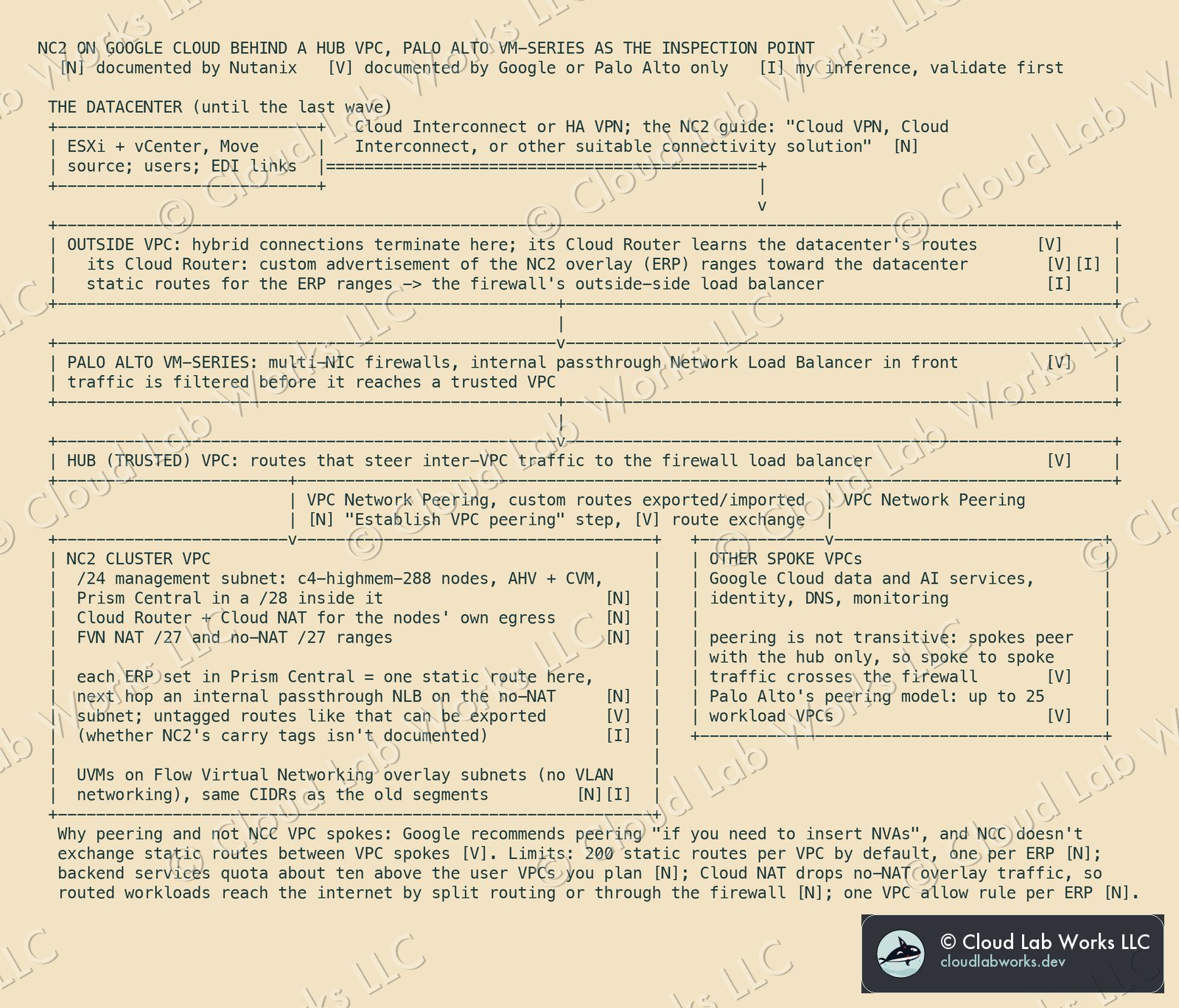
NC2 on Google Cloud has been generally available since November 24, 2025, the date of the guide's first GA edition. What carries over from Azure: AHV, Prism Central, Flow Virtual Networking, categories, Move, the runbooks. What doesn't carry over is the hub, and I want to be plain about it, because "the same pattern in Google Cloud" is the part of the ask that public documentation doesn't support as stated. The NC2 on Google Cloud guide doesn't mention Network Connectivity Center, Palo Alto, Cloud NGFW or Network Security Integration. There's no Nutanix-documented equivalent of the Azure secured-hub procedure. What exists is a set of separately documented pieces, and joining them is design work you validate, not a reference you follow.
The reason is mechanical. NC2 on Google Cloud has no Flow Gateway VMs and no BGP VMs. The NC2 on Google Cloud Deployment and User Guide (edition of October 6, 2026) puts routed (no-NAT) overlay prefixes into the VPC as static routes: "Each ERP configured in Prism Central creates a corresponding static route in the Google Cloud VPC," and "each prefix destination points to a forwarding rule of type internal passthrough Network Load Balancer that uses an internal IP address from the no-NAT subnet as the next hop." An ERP, an externally routable prefix, is an overlay range you've chosen to route without NAT.
Static routes decide the hub:
- Network Connectivity Center is out as the hub for this traffic. Google's NCC static routes page says "Static routes exchange across VPC spokes isn't supported," with a narrow exception for routes whose next hop is an internal passthrough load balancer in another spoke. Google's VPC design guide lists NCC's "Limited NVA insertion options" and says "We recommend that you use VPC Network Peering if you need to insert network virtual appliances (NVAs), such as firewall VMs."
- VPC Network Peering is in. It's also step 1 of the NC2 guide's post-deployment workflow ("Establish VPC peering"). Google's peering page says "Peered networks can exchange static routes that use internal passthrough Network Load Balancers as next hops," exported only with custom route export, and never for routes that carry network tags. Whether NC2's routes carry tags isn't documented. Look at one in the console before anything else.
- The firewall is Palo Alto VM-Series. Palo Alto's Securing VPC Networks with VM-Series Firewall on GCP describes the peering model: "the trust VPC serves as a hub network for workload VPCs," and "each spoke VPC network has custom or policy-based routes to steer inter-VPC and intra-VPC traffic to the internal load balancer in the hub network," for "up to 25 workload VPCs." The same page lists Panorama among what you need. Google's Cloud NGFW Enterprise is Google's own service (its threat prevention is "powered by Palo Alto Networks"), so the two clouds use two different Palo Alto offerings. Plan one policy, deployed twice.
- The datacenter's routes and the overlay's routes meet at the firewall. Hybrid connections terminate in an outside VPC, and the firewall sits between it and the trusted hub, which is the pattern Google's VPC design guide describes for an L7 firewall. The BGP sessions to the datacenter run on the outside VPC's Cloud Router. It advertises subnet ranges by default, not routes that live in other VPCs, so the ERP ranges go into its custom advertisement, and the outside VPC gets static routes for those ranges pointing at the firewall's outside-side load balancer. The behavior is Google-documented. Applying it to NC2 is my design.
Three more constraints from the NC2 guide belong in the design review. The default limit is "200 static routes per VPC," one per ERP, and more than 60 user VPCs with ERPs needs a backend services quota increase. Cloud NAT "silently drops" no-NAT overlay traffic, so a routed workload reaches the internet through split routing or through "an in-cloud Network Virtual Appliance (NVA) or proxy server." And every ERP needs a matching allow rule in the Google Cloud VPC firewall.
Two options I didn't build on. Network Security Integration in-band mode is generally available and lists Palo Alto VM-Series as a partner. It inserts appliances "without changing routes in the VPC network," which is attractive, but nothing I could read says it intercepts overlay traffic leaving an AHV host on a bare-metal instance. NCC's star topology with VM-Series as router appliances in the center group is a Google reference architecture, but it runs into the static route rule above. Both are proof-of-concept items, not wave 1 dependencies.
Network and security parity: what "the same" can honestly mean
The hub can't be literally the same in both clouds, because the two NC2 implementations hand their overlay routes to the cloud differently: BGP from the BGP VMs on Azure, static routes to load balancer next hops on Google Cloud. What can be the same is the contract each hub enforces, written once and checked per wave:
| Contract | Azure | Google Cloud |
|---|---|---|
| Datacenter to NC2 traffic is inspected | routing intent, private traffic, to Cloud NGFW | datacenter routes land in the outside VPC; VM-Series sits between it and the trusted hub |
| Spoke to spoke traffic is inspected | routing intent, private traffic | spokes peer only with the hub; their routes point at the firewall load balancer |
| Internet egress from routed workloads is inspected | routing intent, internet traffic | default route to the firewall, the guide's NVA option |
| One rule set | Cloud NGFW, optionally managed from Panorama | VM-Series, managed from Panorama |
| Overlay prefixes known to the hub | BGP VMs to the hub router, up to 50 prefixes per session | one static route per ERP, exported over peering |
| Per-VM policy inside the cluster | Flow Network Security, documented for NC2 on Azure | not found in the public NC2 on Google Cloud pages; confirm in the compatibility matrix |
That table is the security sign-off for a wave. If a row can't be ticked for the cloud a move group is landing in, the group doesn't move. The last row matters most. Traffic between VMs on the same NC2 cluster stays in the overlay and never reaches either hub (my reading of how the overlay works, not a vendor statement), so on Google Cloud the hub firewall can't replace per-VM policy. Until that row is confirmed, groups that depend on east-west rules inside a segment go to Azure first, or wait.
The same row decides how the dependency map gets its second check. Flow Network Security runs on AHV, so it can't watch the ESXi source. But on the landing side it has a monitor state where "the application continues to receive all traffic even from the disallowed source, but disallowed traffic is highlighted on the monitoring page." Land the group with its policy in monitor, compare what's highlighted with the map, then enforce. That's the "Flow monitor mode on arrival" in the risk register, and it's available where Flow Network Security is.
The risk register
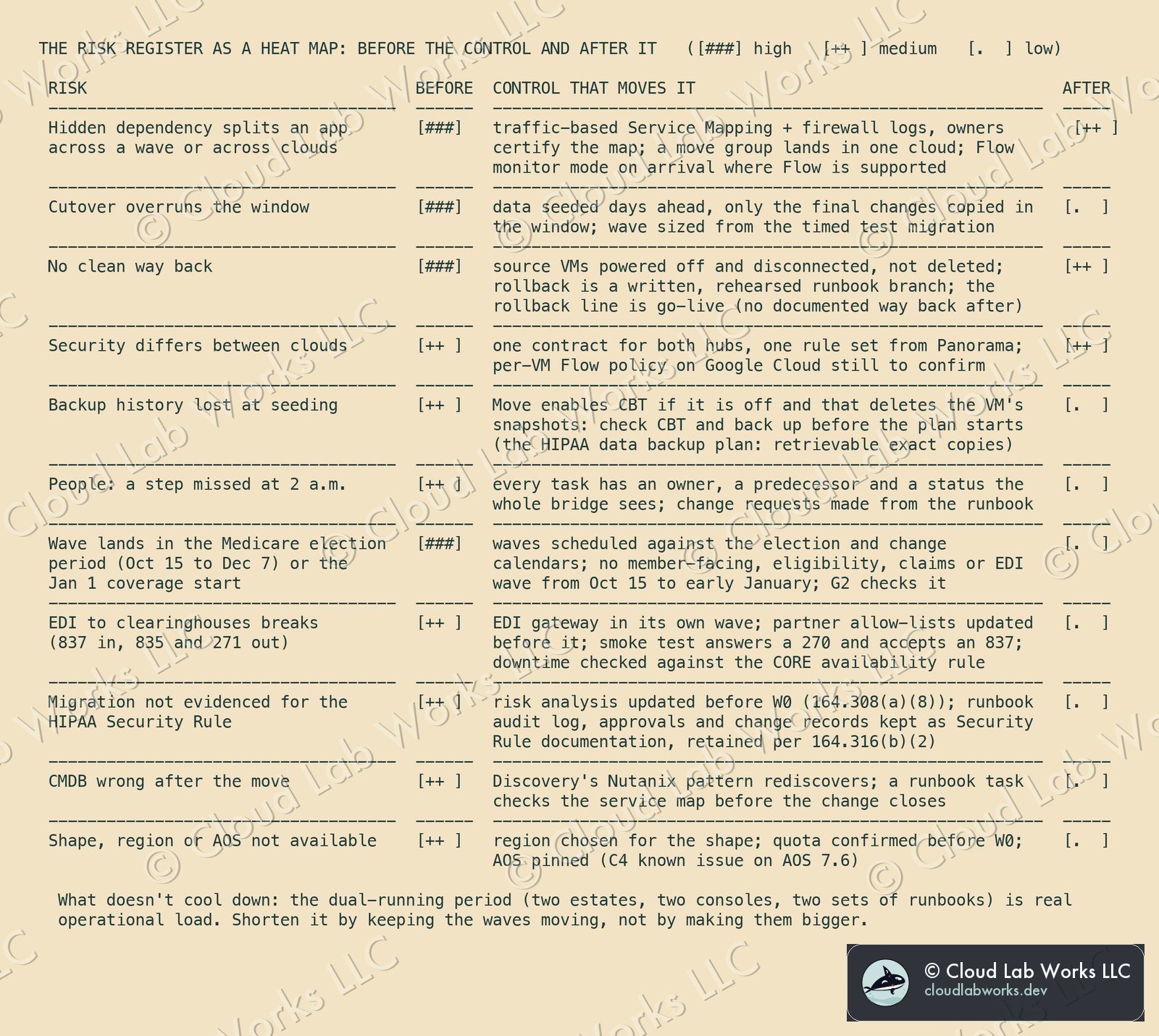
Each control is tied to a source above. Two rows are the health plan's own: the election calendar, and the EDI path to clearinghouses. Two risks stay warm on purpose. The way back closes at go-live, because nothing documented carries new writes back to the source. And security parity on Google Cloud waits on the per-VM policy row. Both belong on the program's risk register in those words, not rounded down to green.
What it costs the architecture
| Retired with the datacenter | Taken on |
|---|---|
| vCenter, ESXi, and the hardware refresh cycle under them | Two Prism Centrals, one per cloud region; the NC2 console for cluster lifecycle |
| Perimeter firewalls in the building | Two hub designs that do one job differently: Cloud NGFW in a secured vWAN hub, VM-Series in a peering hub. One rule set, two mechanisms to operate |
| Port groups and VLANs | Flow Virtual Networking overlays and ERPs, learned twice: Flow Gateways and BGP on Azure, static routes to load balancer next hops on Google Cloud |
| A move-by-spreadsheet tradition | A CMDB that has to be right, and a runbook discipline that has to be kept |
| One building as a single point of failure | Lock-in that's easier to see: bare-metal shape and region fixed per cluster, and on Azure the hub firewall narrowed to what routing intent accepts |
The exit path matters as much as the entry. The workloads stay VMs on AHV in both clouds, the same AHV the health plan could run on its own hardware again, and the policies live in Prism Central rather than in either cloud's native constructs. That's the lightest exit this design allows. What doesn't port is the hub. Virtual WAN routing intent and a Google Cloud peering hub each belong to their own cloud, and moving between them is a network project, not a migration.
What this does not claim
- Not a real customer, and not a tested migration. The health insurer is a composite, not any particular plan, and the design is built from public documentation. I haven't run these waves.
- Not compliance advice. I quote the HIPAA, X12 and Medicare rule text. Mapping it to this design is mine, and the plan's compliance and privacy officers own the real mapping, including which cloud services each business associate agreement covers.
- Not a load forecast. The election dates are CMS's. That load peaks around them is my planning assumption, and I give no volumes.
- Not an ExpressRoute secured-hub design documented by Nutanix. The inspection procedure is written with site-to-site VPN into the hub. Confirm ExpressRoute plus routing intent with Nutanix before it's on a whiteboard as done.
- Not VM-Series in the Azure hub. In a vWAN hub with routing intent, the Palo Alto option is Cloud NGFW. VM-Series goes in a spoke there.
- Not the same hub on both clouds, and not a Nutanix-documented Google Cloud hub. The Google Cloud design joins Nutanix, Google and Palo Alto documentation. The tags on NC2's ERP routes, the custom advertisement of ERP ranges, and Move's placement for Google Cloud are all validation items.
- Not Flow Network Security on NC2 on Google Cloud. Not found in public documentation. Not ruled out either.
- Not one Prism Central, and not cross-cloud DR. Each cloud has its own, and I found no documented Azure to Google Cloud disaster recovery path.
- Not a finished end state. The private path between the two clouds, for directory replication and shared tooling after the datacenter is gone, is an open design item.
- Not modernization. This is the re-host. Modernizing the applications is the second move.
- Not a tool that builds waves. Neither ServiceNow nor Cutover documents turning dependency maps into move groups. The method here is the team's, with the CMDB as its input.
- Not ServiceNow Store integrations. I couldn't read the Store, so nothing here depends on a Nutanix or Cutover Store app.
- Versions and tables move. The bare-metal, region and Move tables have all changed this year. Re-read them on the day you plan.
Sources (all read October 7, 2026): Nutanix, Nutanix Cloud Clusters on Azure Deployment and User Guide, edition of October 5, 2026 (bare-metal SKUs and regions, Flow Gateway modes, vWAN and Route Server options, User-Defined Routing for Network Virtual Appliances, Supporting Traffic Inspection Through NVA in the vWAN Hub, Prism Central registration, Flow Network Security support); Nutanix, Nutanix Cloud Clusters on Google Cloud Deployment and User Guide, edition of October 6, 2026 (bare-metal instances, regions, deployment workflow, connectivity for user VMs with no-NAT, backend services quota, Prism Central registration, limitations) and the NC2 on Google Cloud Release Notes (GA date, supported versions, known issues); Nutanix, TN-2040 NC2 on Google Cloud; Nutanix, Move 6.3 User Guide (overview, ESXi to AHV and NC2, deployment recommendations, requirements, migration plans, test migration, cutover, guest preparation, IP retention, limitations) and KB-20812; Nutanix, Flow Network Security Guide 7.6 (monitor state, deployments, requirements); Nutanix, Disaster Recovery Guide (NC2 to NC2); Microsoft Learn, How to configure Virtual WAN Hub routing intent and routing policies, Install Palo Alto Networks Cloud NGFW in a Virtual WAN hub, About BGP peering with a virtual hub and About NVAs in a Virtual WAN hub; Palo Alto Networks, Cloud NGFW for Azure Supported Regions and Zones (East US 2 listed), Cloud NGFW for Azure Virtual WAN and Securing VPC Networks with VM-Series Firewall on GCP; Google Cloud, VPC Network Peering, Best practices and reference architectures for VPC design, NCC static routes, NCC connectivity topologies, Cloud Router advertised routes, Network Security Integration overview, in-band partners, Network Security Integration release notes and Cloud NGFW intrusion prevention; ServiceNow (Zurich), Service Mapping overview, top-down discovery, traffic-based discovery, relationship types, VMware vCenter discovery, Nutanix discovery pattern, CMDB Health, Data Certification, Cloud Migration Assessment and Enterprise Architecture cloud assessment; Cutover, Migrate, Cloud migration, Automated runbooks, ServiceNow integration, Application Metastore, and the developer guide for the ServiceNow change request integration; eCFR, 42 CFR 422.62 (annual coordinated election period; current as of October 5, 2026), 45 CFR Part 164, Subpart C (Security Rule: 164.308(a)(7) and (a)(8), 164.312(b), 164.316(b)(2); current as of October 2, 2026) and 45 CFR Part 162 (162.1102, 162.1202, 162.1203 and 162.1602: adopted X12 5010 standards and eligibility operating rules; current as of October 2, 2026); Medicare.gov (CMS), Joining a plan (Open Enrollment Period, Medicare Advantage Open Enrollment Period, coverage start dates); HHS, Summary of the HIPAA Security Rule and Guidance on HIPAA and Cloud Computing; X12, Transaction Sets (837, 835, 270, 271).
Personal blog. Alex works at Nutanix; the opinions here are his own and nothing here is Nutanix confidential: every fact is public or his own field experience.
Follow along
Get the next post without leaving this page: copy the feed into any reader, or get it by email. Live builds and the lab's music stream on Twitch.
Comments