
Nutanix: Invisible Wires: Agentic Cloud
Leaving GCVE for NC2 on Google Cloud, with NKP as the destination
A customer is on Google Cloud VMware Engine (GCVE). It wants to stay in Google Cloud, near BigQuery and Vertex AI, but not on the VMware stack. It also has a direction for its own applications: containers, on one Kubernetes platform, running in Google Cloud and in its own data centre.
NC2 on Google Cloud answers the first half, and NKP the second. This post is the route between them, written as steps that each end on a check. It builds on two earlier posts, NC2 on Google Cloud, as code and day one on the v4 API, and on the NC2 on Google Cloud reference page.
Two moves, not one
The tempting plan is to containerize on the way out, so that each application leaves GCVE and lands on Kubernetes in one move. I would not do it. It doubles the change made to every application at once, and it ties the exit date to the slowest refactor in the estate.
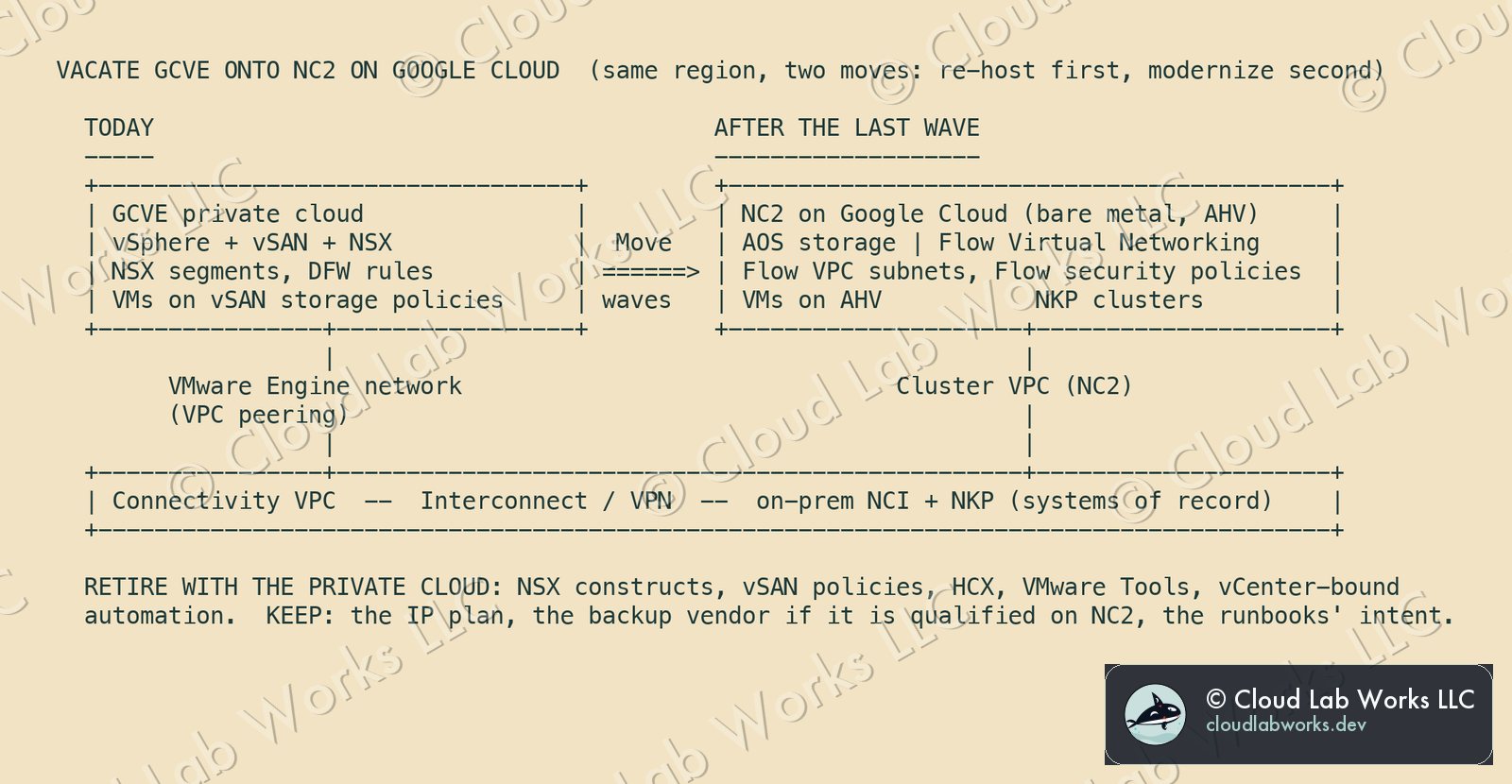
So, two moves. First, re-host every VM onto AHV on NC2 in the same Google Cloud region, unchanged. That gets the estate off the VMware stack on a schedule you control. Second, modernize application by application onto NKP, on a schedule the application teams control. The VM that isn't ready yet keeps running on the same AHV cluster as the containers that will replace it.
The steps
0 · Prove the path before planning anything
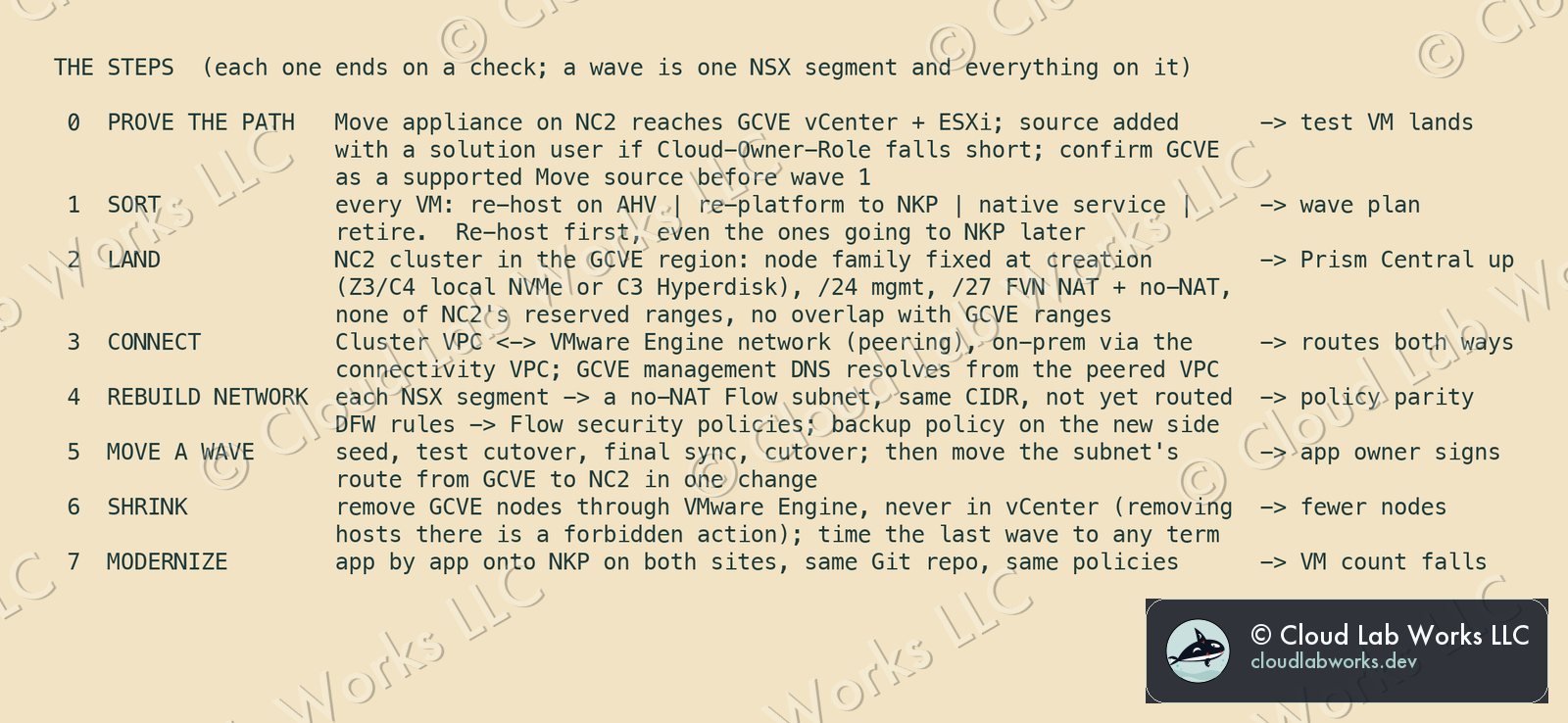
Nutanix Move is the migration tool, and Nutanix qualified it for NC2 on Google Cloud for ESXi and AHV sources. GCVE is ESXi under vCenter, but it is a managed vCenter. Your users get Google's Cloud-Owner-Role, and for tools that need more, Google creates solution user accounts with administrative privileges.
So step 0 is a test, not an assumption. Deploy the Move appliance on the NC2 cluster, add the GCVE vCenter as a source, and migrate one test VM. If Cloud-Owner-Role isn't enough, use a solution user. I did not find GCVE listed by name as a supported Move source, so confirm that with Nutanix before wave 1. If it doesn't hold, the fallback is backup and restore through a vendor qualified on both sides. I have not verified that path for this pairing.
Check: the test VM boots on AHV.
1 · Sort every VM before moving any
Four bins: re-host on AHV, re-platform to NKP, replace with a native Google Cloud service, or retire. Everything in the first two bins re-hosts first, including the VMs going to NKP later. A wave is one NSX segment and everything on it, which keeps the network change in step 5 to a single route.
Check: a wave plan with an owner on every wave.
2 · Land NC2 in the GCVE region
Put the NC2 cluster in the same region as the private cloud, so migration traffic stays in-region. Pick the region for the instance type, not the other way round: NC2's six bare-metal types are available region by region. The node family is fixed when the cluster is created: Z3 or C4 with local NVMe, or C3 with Hyperdisk Balanced. A C3 node's disks can't be added or removed later, so more capacity means another node. Size from what vSAN actually holds, not from what was provisioned.
The cluster needs a /24 management subnet and two /27s for Flow Virtual Networking, one NAT and one no-NAT. It must avoid NC2's reserved ranges (listed on the reference page), and none of it may overlap the GCVE private cloud's ranges.
Check: Prism Central answers.
3 · Connect the two
GCVE reaches your VPCs through its VMware Engine network, by VPC peering. Peer the NC2 cluster VPC with it. Bring on-premises in through a dedicated connectivity VPC, which is what Google's NC2 guide recommends for traffic to non-Google environments. GCVE's management DNS zone resolves automatically from a peered VPC, which is one less thing to build for Move.
Check: routes both ways, and the Move appliance resolves and reaches vCenter.
4 · Rebuild the network before moving anything onto it
NC2 on Google Cloud requires Flow Virtual Networking, an overlay, and doesn't support VLAN networking. Recreate each NSX segment as a no-NAT Flow subnet with the same CIDR, but don't route it yet. Translate the NSX distributed firewall rules into Flow security policies, and check the NC2 on Google Cloud compatibility matrix for the versions you plan to run. Set up backup on the new side too: HYCU, Cohesity, Veeam and Veritas were among the partners qualified at GA.
Check: policy parity on paper, rule by rule, signed by security.
5 · Move a wave
Seed the data, run a test cutover, final sync, cut over. Then move that subnet's route from GCVE to NC2 in one change. The same CIDR is never routed in two places, so the network change for a wave is exactly one route.
Check: the application owner signs off on the wave.
6 · Shrink GCVE as you go
Remove nodes through VMware Engine, never in vCenter. Google lists removing a host from a cluster in vCenter as a forbidden action. If the private cloud runs on a term commitment, time the last wave to its end date.
Check: fewer GCVE nodes after every wave, and zero at the end.
7 · Modernize onto NKP
Now the second move starts. Application by application, components move from VMs onto NKP. Nutanix states NKP is qualified and supported on NC2 on Google Cloud.
Check: the VM count falls quarter on quarter.
The future state: hybrid by design
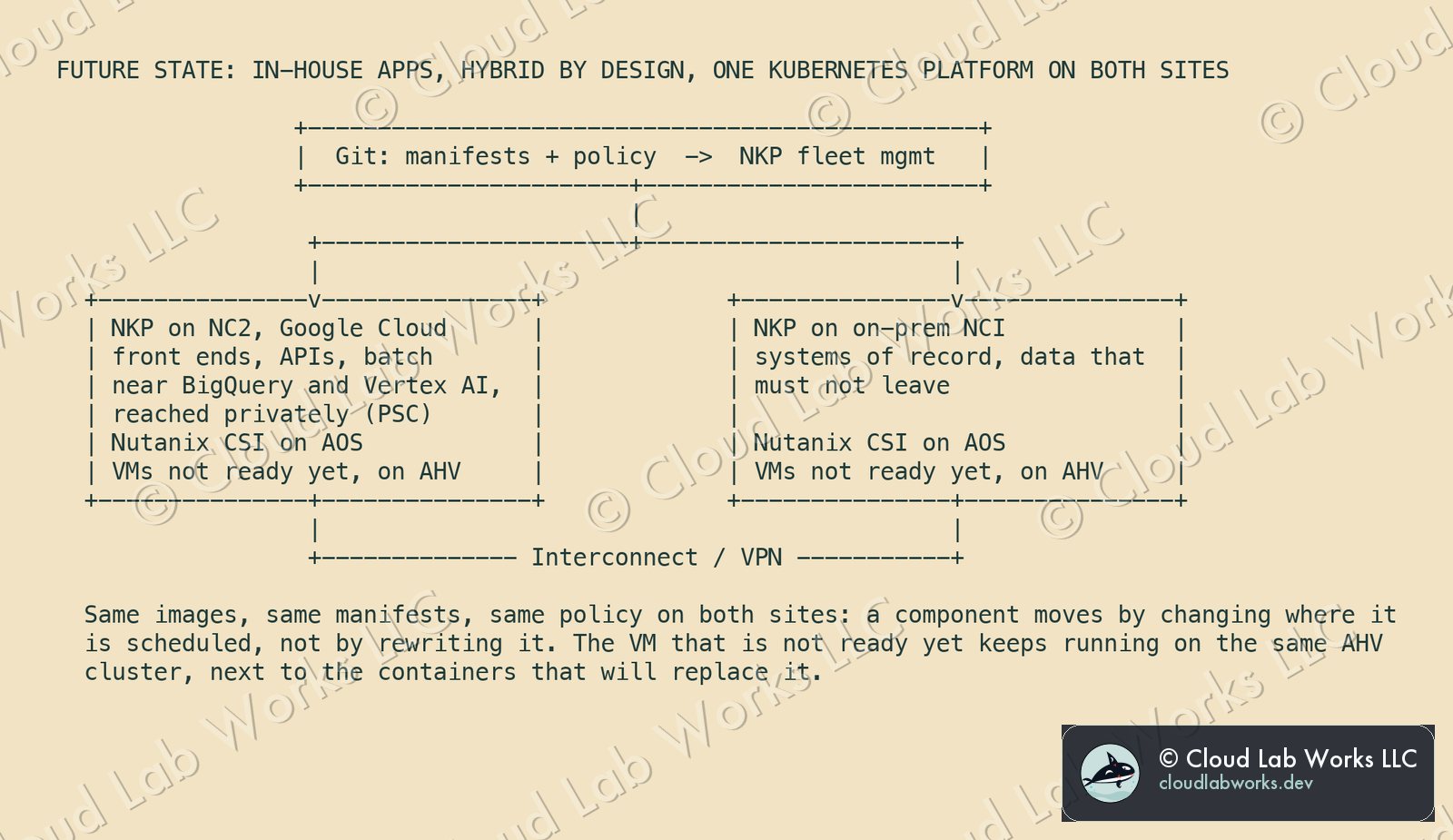
The in-house applications become hybrid on purpose. Front ends, APIs and batch jobs run on NKP on NC2, close to BigQuery and Vertex AI, reached privately through Private Service Connect. Systems of record, and the data that must not leave, stay on NKP in the data centre. Persistent volumes on both sides come from Nutanix CSI on AOS.
One Git repository holds the manifests and policy for both sites, and one NKP management plane runs the fleet. So a component moves between sites by changing where it is scheduled, without rewriting it. That is the point of having the same platform on both sides.
What it costs the architecture
| Retired with the private cloud | Taken on |
|---|---|
| NSX segments and distributed firewall rules | Flow Virtual Networking: an overlay the network team has to learn |
| vSAN storage policies | Node family and redundancy fixed at cluster creation |
| HCX and VMware Tools | A second management plane (vCenter and Prism Central) for the length of the waves |
| vCenter-bound scripts and automation | Rewriting them against one API for the estate |
| One platform per site, VMware in the cloud and something else on-prem | One platform, AHV and NKP, on both |
The right-hand column is real work. Most of it is temporary, which is more than the left-hand column can say.
What this does not claim
- Not a tested migration. These are planning steps built from published documentation, not from a run against a live GCVE private cloud.
- GCVE as a Move source is unconfirmed. Step 0 exists because of that.
- Versions move. Check the NC2 on Google Cloud compatibility matrix for Flow Network Security, NKP and partner software on the day you plan.
Sources: Nutanix Community, NC2 on Google Cloud is GA (Move qualification for ESXi and AHV sources, NKP qualified and supported, Flow Virtual Networking required, GA partners); Google Cloud, Nutanix Cloud Clusters (NC2) on Google Cloud solution guide (Move from ESXi, Hyper-V or AHV, Flow Virtual Networking mandatory with no VLAN networking, connectivity VPC, Private Service Connect, CSI on AOS); Nutanix, Nutanix Cloud Clusters on Google Cloud Deployment and User Guide, August 25, 2026 (instance types, regions, subnets, reserved ranges, fixed node type); Google Cloud, About VMware Engine networks (VPC peering, management DNS resolution); Google Cloud, Elevate VMware Engine privileges (Cloud-Owner-Role, solution user accounts, forbidden actions); Nutanix, Nutanix Kubernetes Platform product page (hybrid multicloud fleet management with GitOps).
Personal blog. Alex works at Nutanix; the opinions here are his own and nothing here is Nutanix confidential: every fact is public or his own field experience.
Follow along
Get the next post without leaving this page: copy the feed into any reader, or get it by email. Live builds and the lab's music stream on Twitch.
Comments