
Nutanix: Invisible Wires: Agentic Cloud
The cheap seat: edge-class inference on NC2 on AWS with the NVIDIA T4
In Where should the model run? I rejected NC2 on AWS's GPU option for a regulated RAG assistant. That was the right call for that workload: one 8B chat model serving a whole company, and a platform, Nutanix Enterprise AI, that doesn't list the T4 as supported.
The same GPU is the right answer for a different workload, and it's a common one. This post is about that workload.
The workload: edge-class inference
By edge-class I mean inference that is small, fast and close to the thing that calls it. A vision model reading a camera feed. Speech-to-text on a support line. Embeddings and a reranker for search. OCR on scanned forms. A small 8B model doing classification or tool calls, not long conversations.
Each one is light on its own. There are usually a lot of them. And each wants to sit next to the application it serves, not across a network boundary on a separate platform.
The hardware you already have
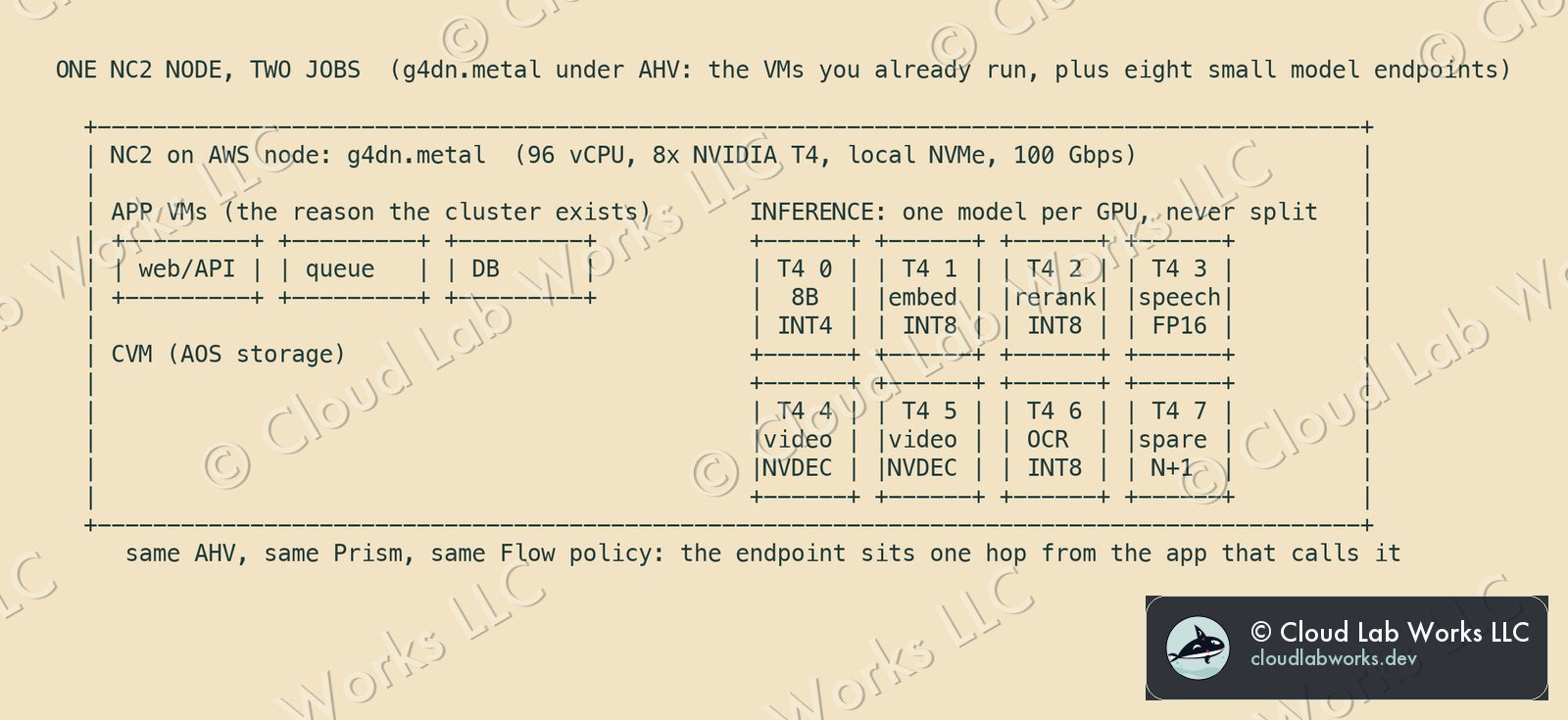
The only GPU instance NC2 on AWS supports is the g4dn.metal: eight NVIDIA T4 GPUs in a bare-metal node, with 96 vCPUs, local NVMe and 100 Gbps networking. AWS positions G4dn as its lowest-cost GPU instances for machine-learning inference.
The T4 is built for exactly this class of work. NVIDIA's numbers: 16 GB of memory, 70 watts, tensor cores for FP16, INT8 and INT4, and hardware video decode for up to 38 full-HD streams. It's a 2018 design from the Turing generation, and that matters later.
If your NC2 cluster runs on g4dn.metal nodes for its VMs anyway, the GPUs are already there.
Five design rules
- One model per GPU, never split. The T4 sits on PCIe Gen3 with no NVLink between cards. Sharding one model across several T4s spends most of its time waiting on the bus. Size every model to fit one card.
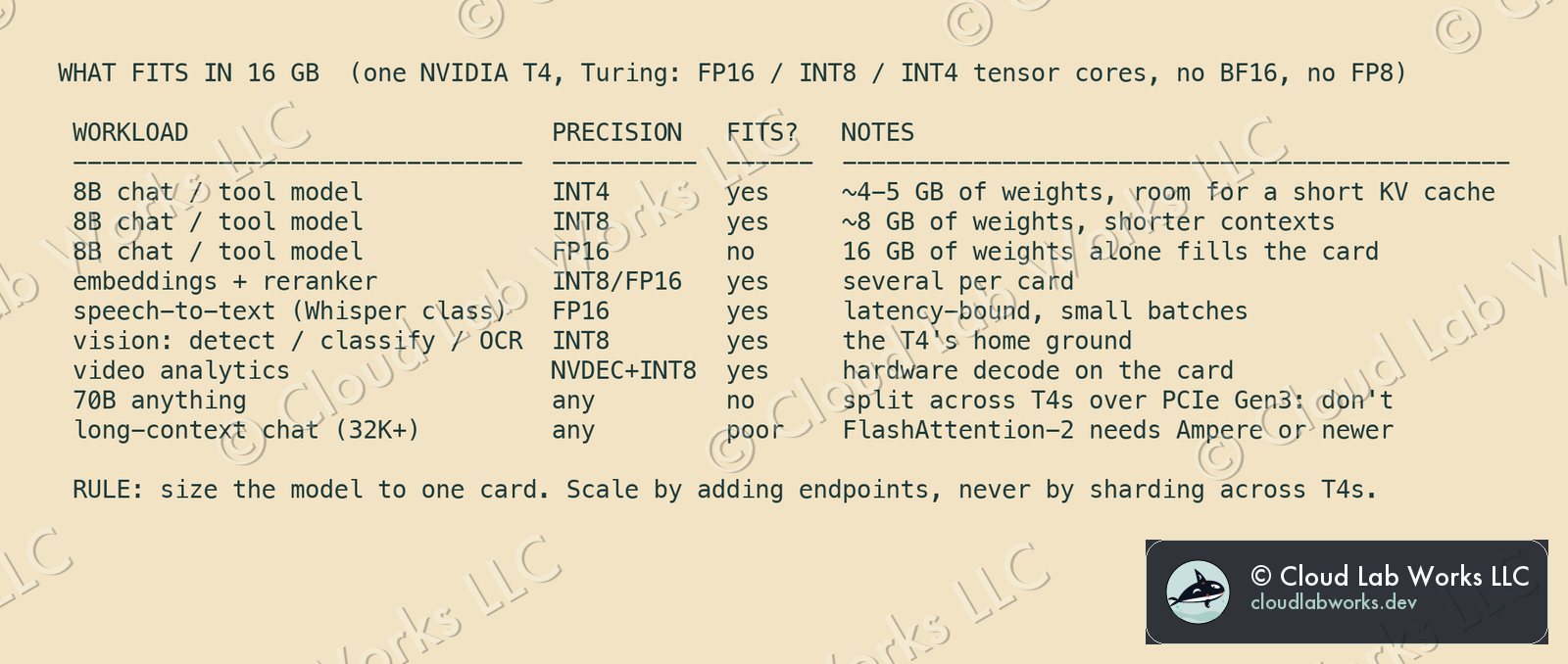
- Quantize. The T4's tensor cores do INT8 and INT4. An 8B model is about 16 GB at FP16, which fills the card before any context. At INT8 it's about 8 GB, and at INT4 about 4 to 5 GB, leaving room for the KV cache.
- Keep contexts short. The T4 has no BF16 and no FP8, and FlashAttention-2 needs Ampere or newer; Turing is covered only by a separate project with a subset of the features. Long-context chat runs poorly here. Classification, extraction, tool calls and short answers run fine.
- Run the serving stack yourself. Because Nutanix Enterprise AI doesn't officially support the T4, serve the models with an open-source stack in VMs on the same cluster, or on Kubernetes if you run it there. vLLM supports compute capability 7.5 and up, and names the T4 as its floor. llama.cpp and NVIDIA's Triton are the other usual choices.
- Keep a spare card, not a spare node. One idle T4 per node is the N+1 for every endpoint on it. That's far cheaper for the architecture than holding a whole node in reserve.
Where the low cost comes from
None of it is a price list. It comes from four architecture choices.
- No second platform. The endpoints run on the AHV cluster, under the same Prism, the same Flow policies and the same backup as the application VMs. Nothing new to operate, secure or audit.
- Capacity you've already committed. The node exists for the VMs. The GPUs inside it are otherwise idle.
- Small, quantized models. INT8 and INT4 on a 70-watt card is the cheapest way to answer a question that doesn't need a big model.
- One hop. The endpoint sits on the same cluster network as the app that calls it. No traffic crosses into another service or another account to get an answer.
What it costs the architecture
| You take on | Why it's acceptable here |
|---|---|
| You own the serving stack: images, upgrades, monitoring | The models are small and few in kind. One serving image covers most of them |
| No official NAI support on the T4 | NAI isn't in the path. If the workload outgrows the T4, it moves to the platform in the decision record |
| A 2018 GPU: no BF16, no FP8, no FlashAttention-2 | Small models at short contexts don't need them. Plan the move to the next GPU instance type when NC2 on AWS qualifies one |
| GPUs scale with nodes: more GPUs means more bare metal | Endpoints are sized to one card, so you add a node only when the VMs or the endpoints run out of room |
| A 16 GB ceiling per model | That's the design: anything bigger belongs elsewhere |
When to say no
The decision record's workload is the counter-example: one model serving 2,000 people at 2,560 tokens a second with retrieval context. That needs bigger cards and a supported inference platform, so the T4 is the wrong seat. Use the T4 when the models are small, many and close to the app. Use something else when one model is large, central and shared.
The architecture: one stack, a cloud end and an edge end
The serving images, quantized model files and endpoint layout built here don't care where the GPU lives. The same stack runs on an inference card in an on-prem edge cluster under AHV. NC2 on AWS becomes the cloud end of that estate: test a model there, ship the same files to the sites, and burst back to the cloud when a site is short.
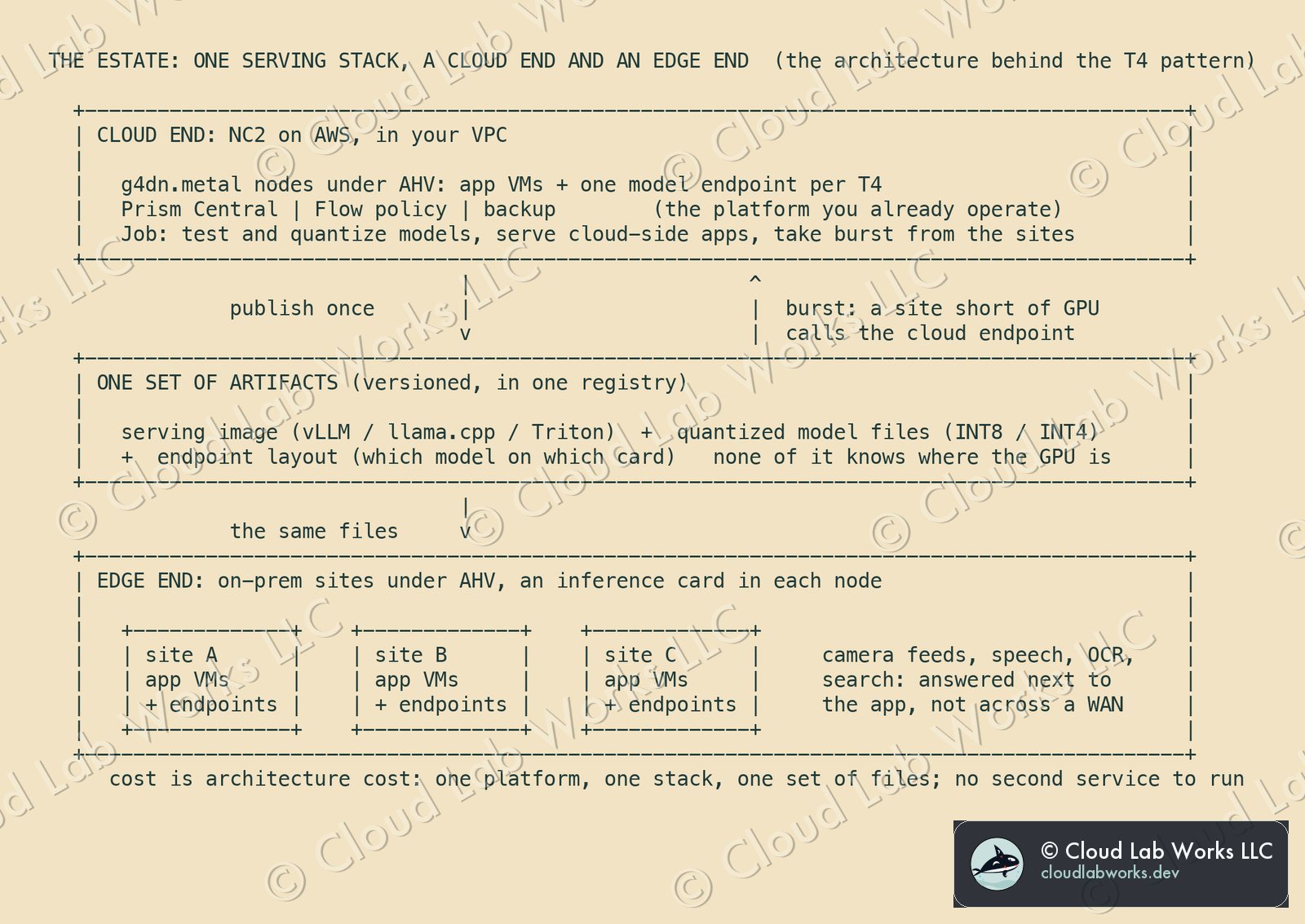
Three layers, and only the middle one is new. The cloud end and the edge sites are AHV clusters you already know how to run. The artifacts (one serving image, the quantized model files, and a record of which model sits on which card) are versioned in one registry and published once. A site that runs short of GPU calls the cloud endpoint over a private link to the VPC (VPN or Direct Connect); the stack itself doesn't change to make that work.
What this does not claim
- No benchmarks. The memory figures are arithmetic from parameter counts and published specs. Measure throughput and latency on your own models before you size anything.
- No prices. Cost here is architecture cost: what you run, operate and give up.
- GPU assignment and licensing. How each T4 is assigned to a VM on NC2 follows the NVIDIA host driver setup in the NC2 on AWS guide. Check NVIDIA's licensing for compute workloads before you design around shared GPU profiles.
Sources: Nutanix, NC2 on AWS: Supported Regions and Bare-metal Instances and Installing NVIDIA GRID Host Driver (g4dn.metal is the only supported GPU instance; T4); Nutanix, Nutanix Enterprise AI 2.8 Requirements (supported GPUs; unlisted GPUs not officially supported); AWS, Amazon EC2 G4 Instances (up to 8 T4s, 96 vCPUs, 100 Gbps, local NVMe, bare metal; positioned for low-cost inference); NVIDIA, T4 Tensor Core GPU (16 GB GDDR6, 70 W, FP16 / INT8 / INT4, PCIe Gen3 x16, video decode); vLLM, GPU installation (compute capability 7.5 or higher, T4 named); Dao-AILab, flash-attention (FlashAttention-2 requires Ampere, Ada or Hopper; Turing in a separate subset project; BF16 needs Ampere or newer).
Personal blog. Alex works at Nutanix; the opinions here are his own and nothing here is Nutanix confidential: every fact is public or his own field experience.
Follow along
Get the next post without leaving this page: copy the feed into any reader, or get it by email. Live builds and the lab's music stream on Twitch.
Comments