
Nutanix: Invisible Wires: Agentic Cloud
Onboarding people into NC2 without tickets: access and role mapping, done once
A common NC2 access problem isn't a bug. Someone is added in My Nutanix, signs in to the NC2 console, and has no access to anything. Everybody's first guess is a broken invite. It isn't one. They were authenticated, which means NC2 knows who they are. They weren't authorized, which means nothing gives them an NC2 role.
The NC2 user guides say this plainly, in the user management chapter of the current Google Cloud and Azure editions. This post turns that section into an onboarding design you set up once, so that adding a person stops being a ticket.
Two sign-in paths, and what each one gives you
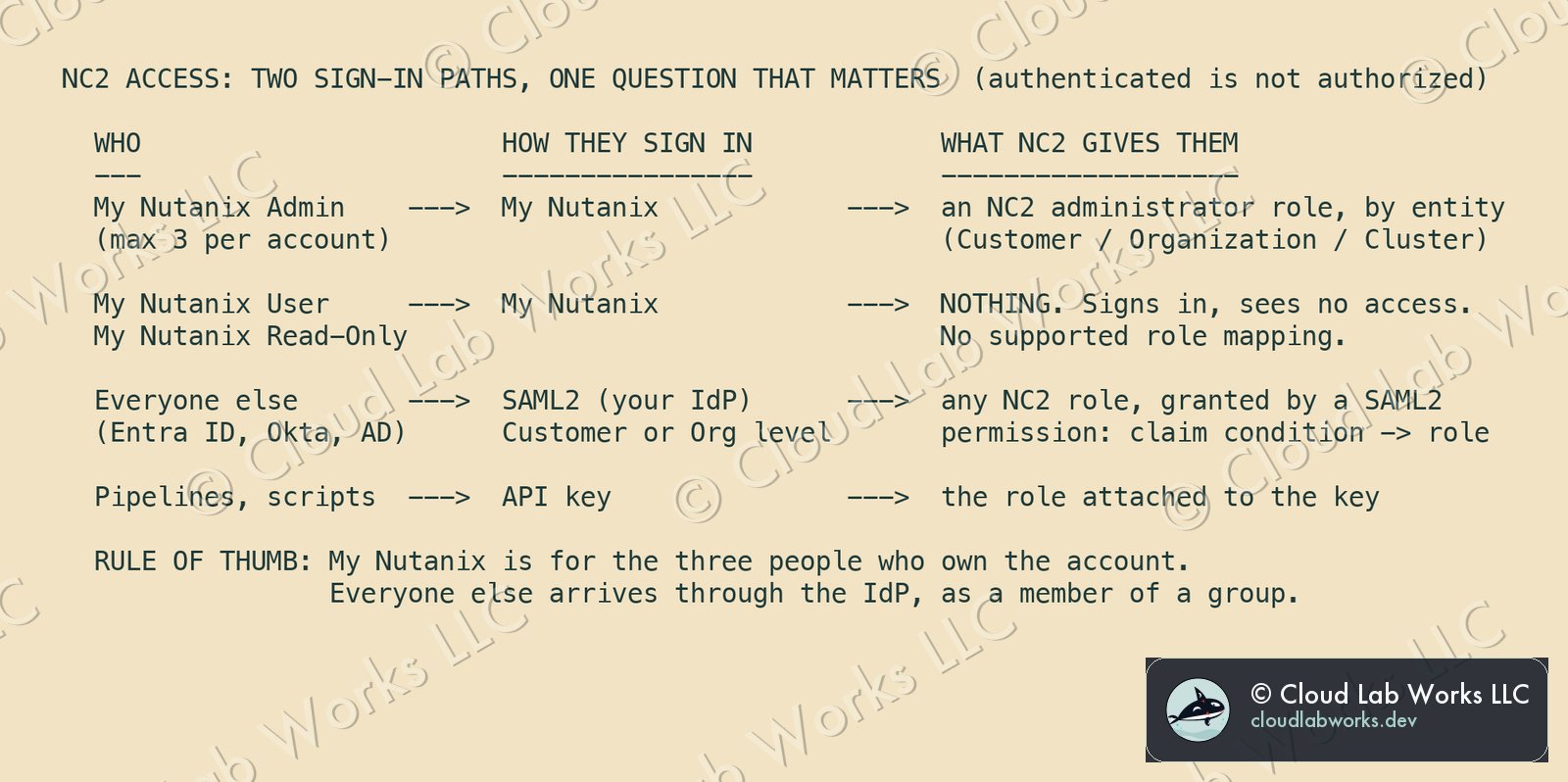
My Nutanix. A My Nutanix Admin can reach NC2 through the supported My Nutanix-to-NC2 administrator role mapping, and is mapped to an administrator role that fits the entity. My Nutanix User and Read-Only have no supported NC2 role mapping. That is the "signed in, sees nothing" user. There's a second limit: a My Nutanix account can have only three account administrators at any one time.
SAML2. Your identity provider (Entra ID, Okta, Active Directory and others) authenticates the user, and a SAML2 permission in NC2 decides which role they get. You configure it at the Customer or the Organization level. The guide's own instruction for every granular role is to use SAML2.
API. For pipelines and scripts, an API key carries the role you attach to it. No person's account belongs in a pipeline.
A username and password is not one of the paths. The guide's revision history records basic authentication being removed from the user section in April 2026.
The rule of thumb that follows: My Nutanix is for the three people who own the account. Everyone else arrives through the identity provider, as a member of a group.
The shape NC2 roles hang on
NC2 has two entities you manage. The Customer is created for you when you sign up, and there is exactly one. Organizations sit under it, typically one per department or environment, and clusters live inside an organization. Roles exist at all three levels:
| Level | Administrator | Read-only | Security | Other |
|---|---|---|---|---|
| Customer | Customer Administrator | Customer Auditor | Customer Security Administrator | |
| Organization | Organization Administrator | Organization Auditor | Organization Security Administrator | |
| Cluster | Cluster Administrator | Cluster Auditor | Cluster Super Admin, Cluster User |
Administrators can only grant what their own level covers. A Customer Administrator can grant any role in any organization. An Organization Administrator can grant roles for that organization and its clusters. The security administrator roles manage the authentication providers, SAML2 settings and users, plus the audit trail, without running clusters. That is the separation of duties most security teams ask for.
Onboarding as a group change, not a ticket
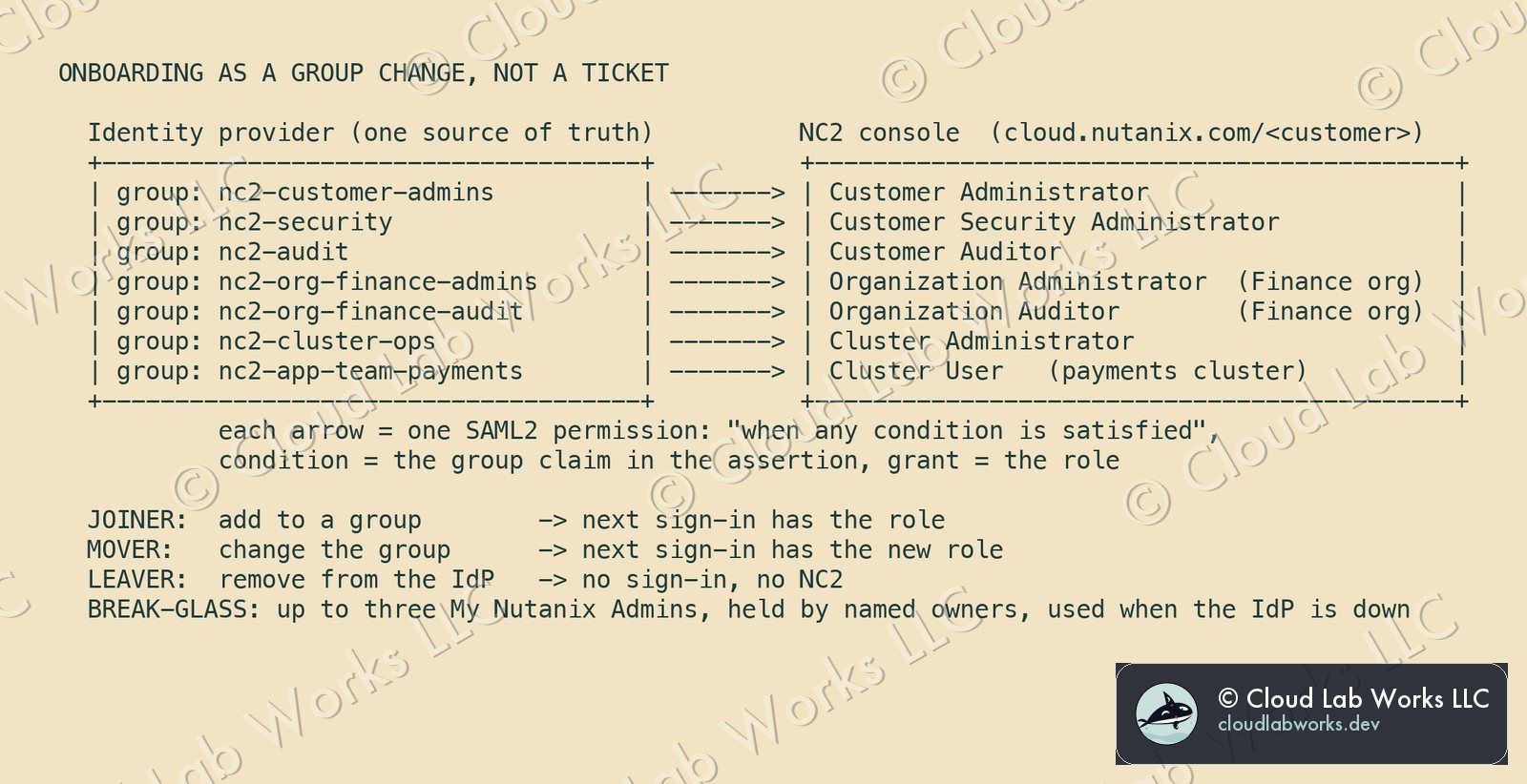
A worked example first. A company runs NC2 for two departments, with a Finance organization and a payments application team. It creates seven groups in its identity provider and one SAML2 permission per group in NC2:
| Identity provider group | NC2 role granted | Where |
|---|---|---|
nc2-customer-admins | Customer Administrator | Customer |
nc2-security | Customer Security Administrator | Customer |
nc2-audit | Customer Auditor | Customer |
nc2-org-finance-admins | Organization Administrator | Finance organization |
nc2-org-finance-audit | Organization Auditor | Finance organization |
nc2-cluster-ops | Cluster Administrator | the clusters ops runs |
nc2-app-team-payments | Cluster User | the payments cluster |
Each permission uses "When any condition is satisfied", its condition is the group claim in the SAML assertion, and its grant is the role. From then on:
- Joiner: add them to a group. Their next sign-in carries the role.
- Mover: change the group. The role follows the claim.
- Leaver: disable them in the identity provider. No sign-in, no NC2.
- Auditor for a week: add them to
nc2-audit, then remove them. Nobody touches the NC2 console.
The setup, in the order that saves rework
- Name the three My Nutanix administrators. They're the account owners and your break-glass access if the identity provider is down. Decide, and write down, whether "Allow Nutanix Admins on MyNutanix to administer this customer" stays on. If the identity provider is your only path in, break-glass has to come from somewhere.
- Choose the level for SAML2. Use the Customer level when one identity provider serves everything, and turn on Enforce settings so organizations can't drift. Use the Organization level when a department really does run its own identity provider. Once the Customer level is enforced, organization-level settings can't be changed, so decide this before departments configure anything.
- Add the provider with a metadata URL, not pasted XML. The guide notes that when the SAML certificate expires, a metadata URL needs no change in NC2, while XML has to be updated by hand. Certificate rotation then stops being an outage you have to remember.
- On Entra ID, two details. The Application ID must be entered as
spn:<Application ID>. The Reply URL on the Entra side is the NC2 one given in the guide, which is different from the URL used when SAML is enabled on the My Nutanix side. - Write one SAML2 permission per group, as in the table, and grant the narrowest role that does the job. Use auditors for reviewers, Cluster User for application teams, and administrators only where someone actually runs something.
- Hand people the customer-specific URL. With SAML enabled, users sign in at
https://cloud.nutanix.com/<customer_URL>so the console offers your identity provider. - Give automation an API key with its own role, and manage its credentials from the API tab, never from a person's account.
What it costs the architecture
- Your identity provider becomes a dependency for NC2 access. The three My Nutanix administrators are the way around that, so treat them like any break-glass account: named owners, tested access, reviewed use.
- Group hygiene becomes access control. A stale group membership is a stale NC2 role. Review the groups on the same schedule as any privileged access.
- One decision is hard to reverse. Customer-level enforcement takes away organization-level choice. That's usually what you want, but make the decision on purpose.
In exchange, onboarding happens where people already exist, and so does offboarding, which matters more. The NC2 console stops being somewhere you manage people at all.
What this does not claim
- Screens and limits move. This follows the user management chapter of the NC2 on Google Cloud guide (October 6, 2026) and the Azure guide (October 5, 2026). Re-read it for your cloud before you configure anything.
- The group names are an example, not a Nutanix convention.
- "The next sign-in carries the new role" assumes the permission is written against the group claim, as above. A permission set to "Always" grants its role to every authenticated user of that provider, which is rarely what you want.
Sources: Nutanix, Nutanix Cloud Clusters on Google Cloud Deployment and User Guide, edition of October 6, 2026, chapter "NC2 User Management" (entities, user roles, adding users from the NC2 console, My Nutanix and SAML2 authentication, SAML2 permissions, API authentication, the three-administrator limit, the metadata URL and certificate expiry note, Entra ID Application ID format and Reply URL); Nutanix, Nutanix Cloud Clusters on Azure Deployment and User Guide, edition of October 5, 2026, same chapter.
Personal blog. Alex works at Nutanix; the opinions here are his own and nothing here is Nutanix confidential: every fact is public or his own field experience.
Follow along
Get the next post without leaving this page: copy the feed into any reader, or get it by email. Live builds and the lab's music stream on Twitch.
Comments