
Nutanix: Invisible Wires: Agentic Cloud · Nutanix Knowledge Base · Code
Ask the cloud which permissions you're missing, before NC2 onboarding asks for you
The first NC2 deployment in a new cloud account rarely fails on the hard parts. It fails on a permission. Someone starts the onboarding, gets three screens in, and the cloud says no. Then a ticket goes to a cloud team that has to work out which of hundreds of permissions is the one that matters.
The NC2 user guides already say what's needed. A checklist says "you need Contributor". What you actually want to know is "you're missing Microsoft.Authorization/roleAssignments/write; ask for User Access Administrator on this subscription", and you want to know it before you start.
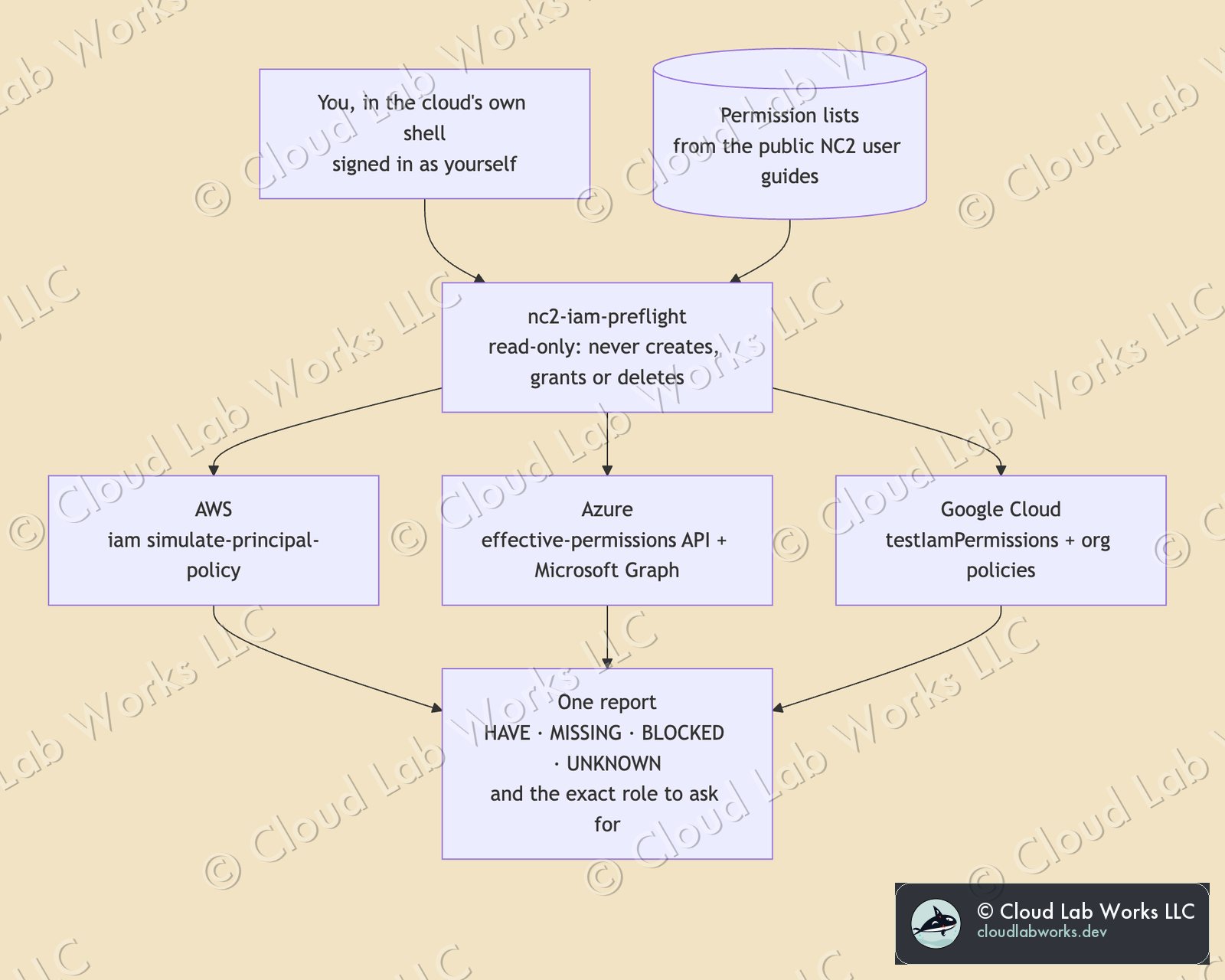
So I built nc2-iam-preflight. You run it in the cloud's own shell, signed in as yourself. It asks the cloud which of the required permissions you hold. It is read-only: it never creates, grants or deletes anything.
Why not a checklist, and why not a VM
A checklist is a list of things somebody believed were true when they wrote it. Your account has policies the checklist has never seen: an organization-wide rule, a permission boundary, a group you were added to last year. The only thing that knows what you can do is the cloud itself, and each cloud has an API that answers exactly that question:
- AWS:
iam simulate-principal-policy, run against your own identity. - Azure: the effective-permissions API on the subscription, plus Microsoft Graph for whether you can register an app.
- Google Cloud:
testIamPermissionson the project, plus the organization policies that sit above IAM.
My first instinct was a small utility VM, like the egress validator I published last month. That works for network checks, because a VM's network path is your network path. It doesn't work for permissions. A VM runs as its own identity, so it would report what the VM can do, not what you can do. The check has to run as the person doing the onboarding, and every cloud shell already does.
Two questions per cloud
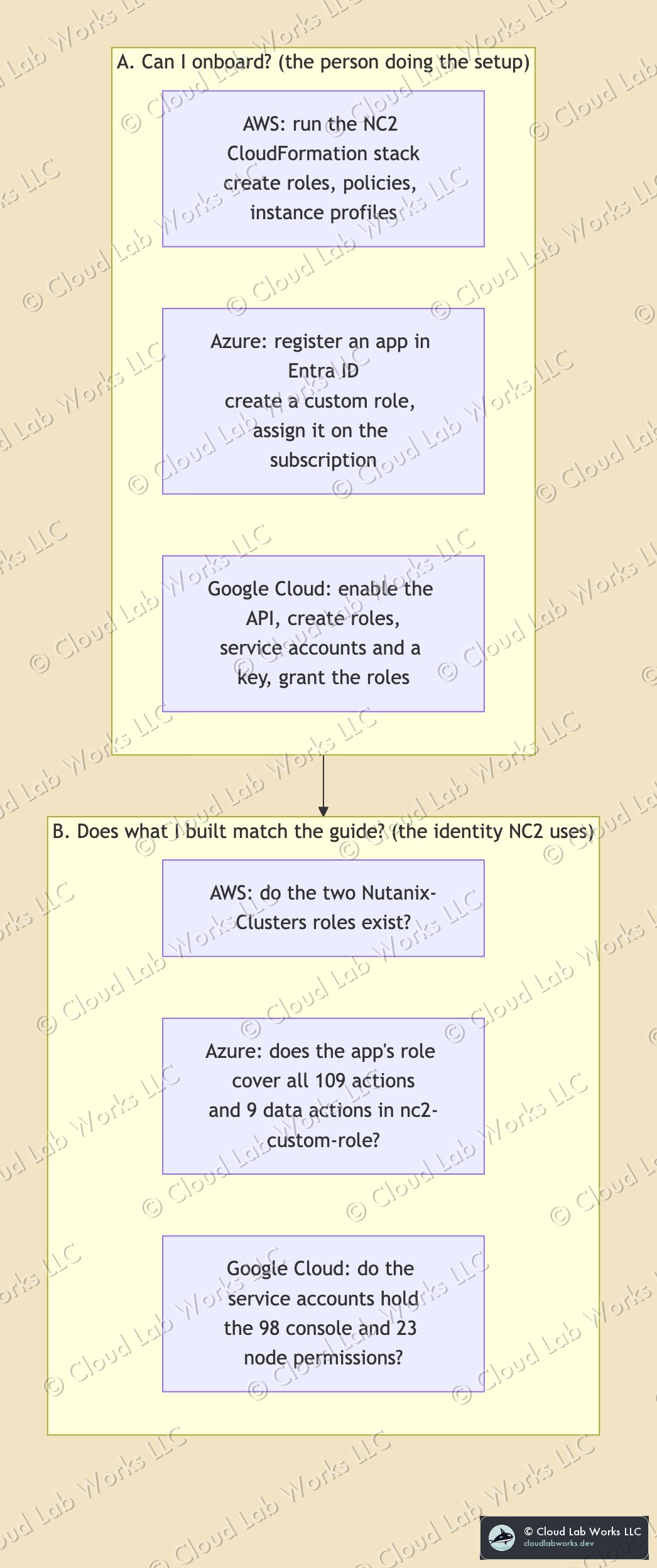
A. Can I onboard? This is about the person doing the setup, and it's where most onboarding actually stalls. On AWS that means running the NC2 CloudFormation stack, which creates IAM roles. On Azure it means registering an app in Entra ID, then creating a custom role and assigning it on the subscription. On Google Cloud it means enabling the Compute Engine API, creating custom roles, service accounts and a key, and granting the roles.
The most common surprise is on Azure. Contributor can't assign roles. It can build almost anything in a subscription except permissions. So the person who "has Contributor, so should be fine" gets to the last step and stops. The tool says so, and names the role that fixes it.
B. Does what I built match the guide? This is about the identity NC2 itself will use: the two Nutanix roles on AWS, the app's role on Azure, the two service accounts on Google Cloud. The tool compares what that identity holds against the permission lists published in the NC2 user guides, and lists the gaps.
MISSING is not the same as BLOCKED
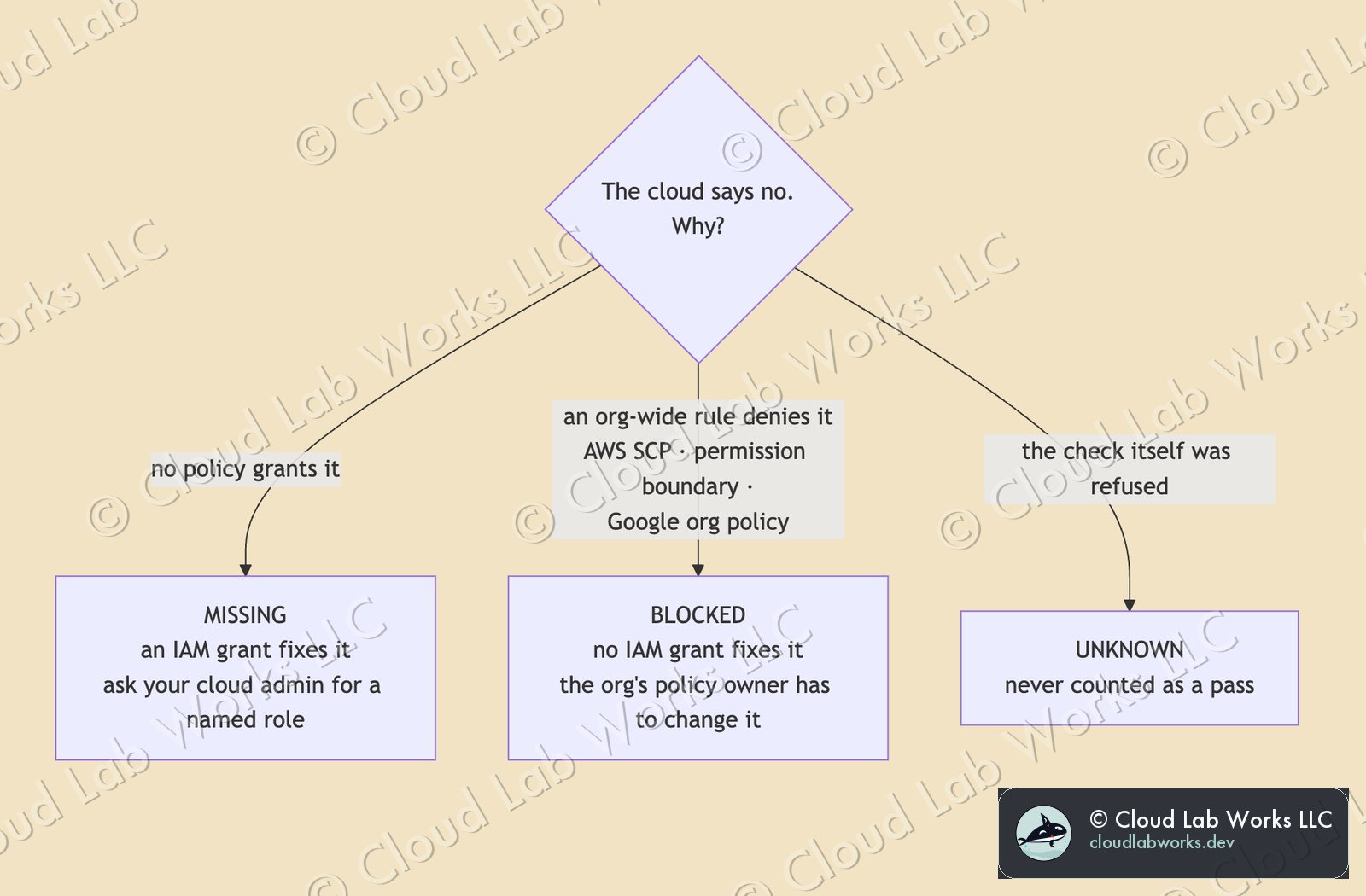
When the cloud says no, the most useful thing to know is who can say yes.
- MISSING: no policy grants it. An IAM grant fixes it, and the report names the role to ask for.
- BLOCKED: something above IAM denies it. On AWS that's a Service Control Policy or a permission boundary. On Google Cloud it's an organization policy, and two of them matter for NC2: one that disables service-account key creation (the NC2 console signs in with a key), and IP forwarding, which the guide requires at the organization level. No amount of IAM granting fixes a BLOCKED item. It goes to whoever owns the organization's policies, which is usually a different team and a longer conversation, so you want to start it early.
- UNKNOWN: the tool couldn't evaluate it, often because the check itself was refused. It is never counted as a pass.
Where the lists come from
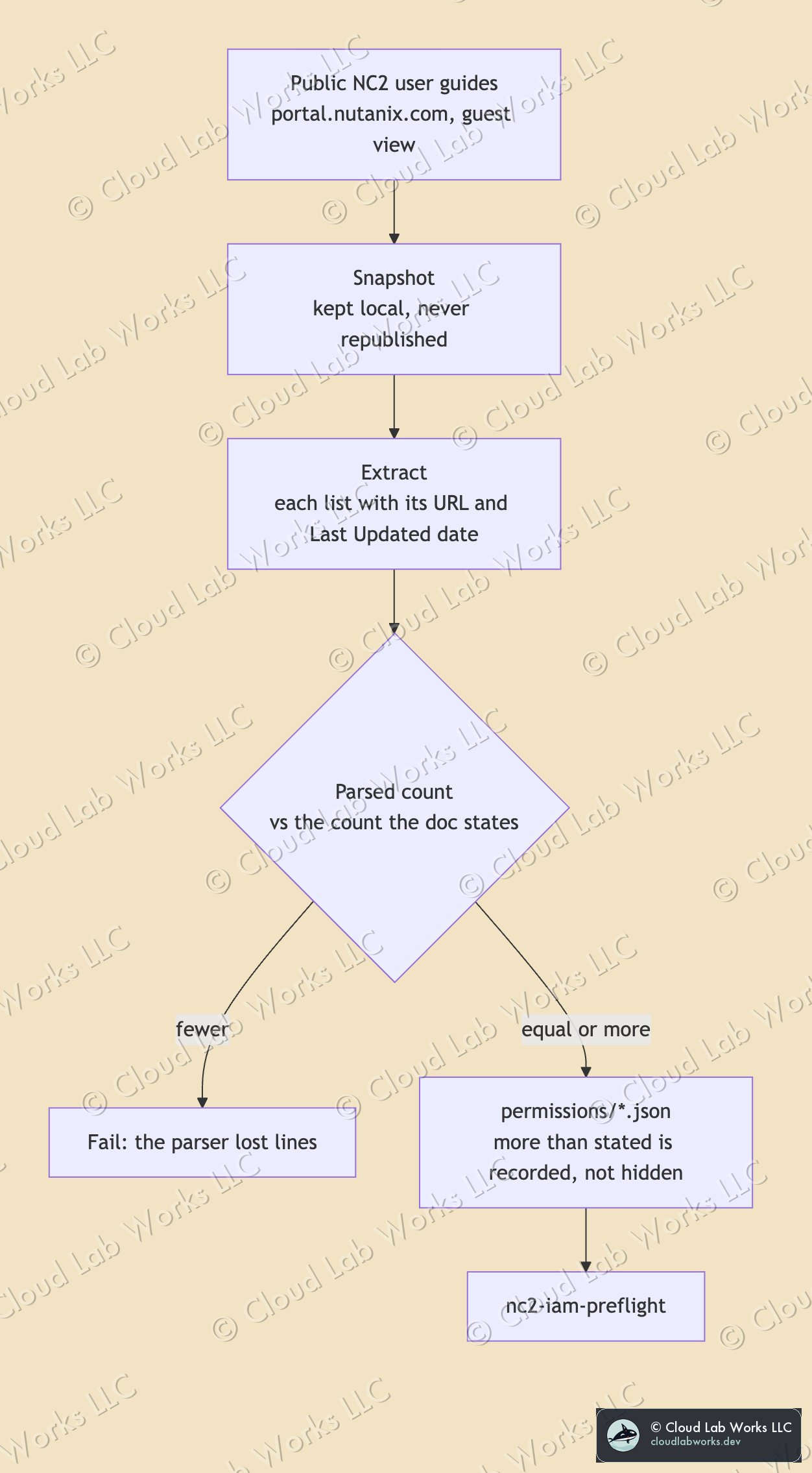
Every permission list comes from the public NC2 user guides, the ones anyone can read without logging in. A script snapshots the pages, extracts each list with its source URL and Last Updated date, and checks the count against the number the guide states. If it parses fewer than the guide says, it fails rather than quietly checking less. The page snapshots stay local. The repo carries the lists and where they came from, not copies of the documentation.
Where the guide doesn't spell out a permission, for example what the person doing the Google Cloud setup needs to create a service account key, the tool maps the documented step to the cloud vendor's own permission for it. Those lists are labelled as derived in the code, so you can see which is which.
What it won't tell you
- Azure deny assignments aren't visible to the effective-permissions API. An action shown as HAVE can still be blocked by one.
- Google Cloud, check B, counts only roles granted directly on the project. Grants at folder or organization level, through groups, or with conditions aren't counted, so a gap there may be a false alarm. The report says so when it happens.
- AWS: the action list is derived from what a CloudFormation stack that creates IAM roles needs. If your organization customises the NC2 template, the actions may differ.
Run it
git clone https://github.com/cloudlabworks/nc2-iam-preflight && cd nc2-iam-preflight

python3 nc2_iam_preflight.py aws
python3 nc2_iam_preflight.py azure --subscription <SUBSCRIPTION_ID> --app-id <NC2_APP_ID>
python3 nc2_iam_preflight.py gcp --project <PROJECT_ID> --console-sa <EMAIL> --nodes-sa <EMAIL>
It needs nothing but Python and the cloud's own CLI, which every cloud shell already has. The exit code is 0 when nothing is missing, so it can sit in front of an automated landing-zone pipeline as well as in front of a person.
Run it before the onboarding meeting, not during it. The cheapest permission problem is the one you find while everyone still has time to fix it.
Personal blog. Alex works at Nutanix; the opinions here are his own and nothing here is Nutanix confidential: every fact is public or his own field experience.