

Invisible Wires: Agentic Cloud
Give an agent a camera without giving it a picture
Most questions you would put to a camera at a bench do not need a picture. Is anyone at the desk? Did something on the shelf move? Is the camera still alive? A person detector and a coarse depth map answer all three. A video feed answers them too, and also hands over everything else in the frame.
That is the idea behind oak-events: an agent should know what a camera sees without ever being handed a picture. It works with Luxonis OAK cameras, and it is open source under the MIT licence. CloudLab Works maintains it.
The whole system
An OAK camera has a chip that can run a neural network and compute stereo depth. oak-events uses that. The detecting, the tracking and the depth measuring all happen on the camera. The host receives detections and a depth map, turns them into events, and appends one JSON line per event to a file. A second process, an MCP server, reads those files and answers questions about them. Any MCP client can ask: Claude, OpenClaw, Home Assistant, or something you wrote.
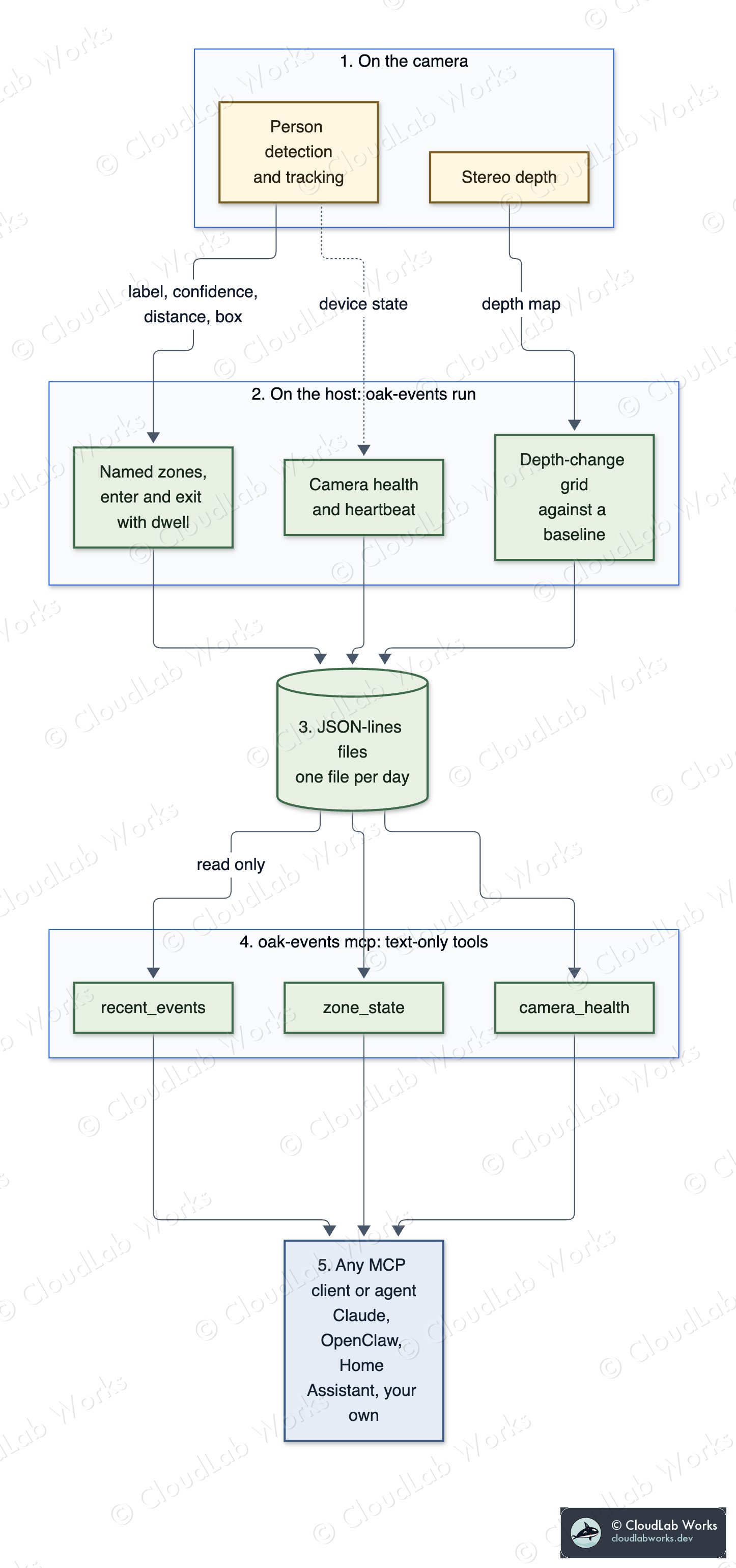
Five stages, top to bottom in the order data moves:
- The camera runs person detection and tracking, and stereo depth, on its own chip.
oak-events runon the host turns detections into person events per named zone, and the depth map into a depth-change grid. It also records camera health.- JSON-lines files, one per local day, written with owner-only permissions.
oak-events mcp, a stdio MCP server with three tools:recent_events,zone_stateandcamera_health. Each returns JSON text.- Any MCP client or agent.
The MCP server only reads the files. It never opens the camera, so an agent that misbehaves cannot reach the device, and stopping the camera process does not take the question-answering side down.
What an event looks like
Every line has a timestamp, a kind and a few fields:
{"ts": "2026-10-11T09:14:03-07:00", "kind": "person_enter", "zone": "doorway", "count": 1, "nearest_mm": 1840}| Kind | What it says |
|---|---|
person_enter | A person was seen in three consecutive frames in a zone, with the distance to the nearest one |
person_exit | Nobody seen for ten seconds, with how long they were there (dwell_s) |
depth_baseline | A baseline depth grid was built; noisy cells are marked and ignored |
depth_change | A cell of the grid has been more than 15% closer or farther for a minute while nobody was present |
camera | Lifecycle: up, not found, error, reconnect, stopped |
alive | A heartbeat with detection rate and whether the zone is occupied |
Zones are named regions of the image, optionally limited by distance. Each zone gets its own tracker and its own depth grid. Depth-change detection pauses while a person is in the zone, because people are not scenery.
The privacy boundary
The second diagram shows what crosses each line, and what never does.
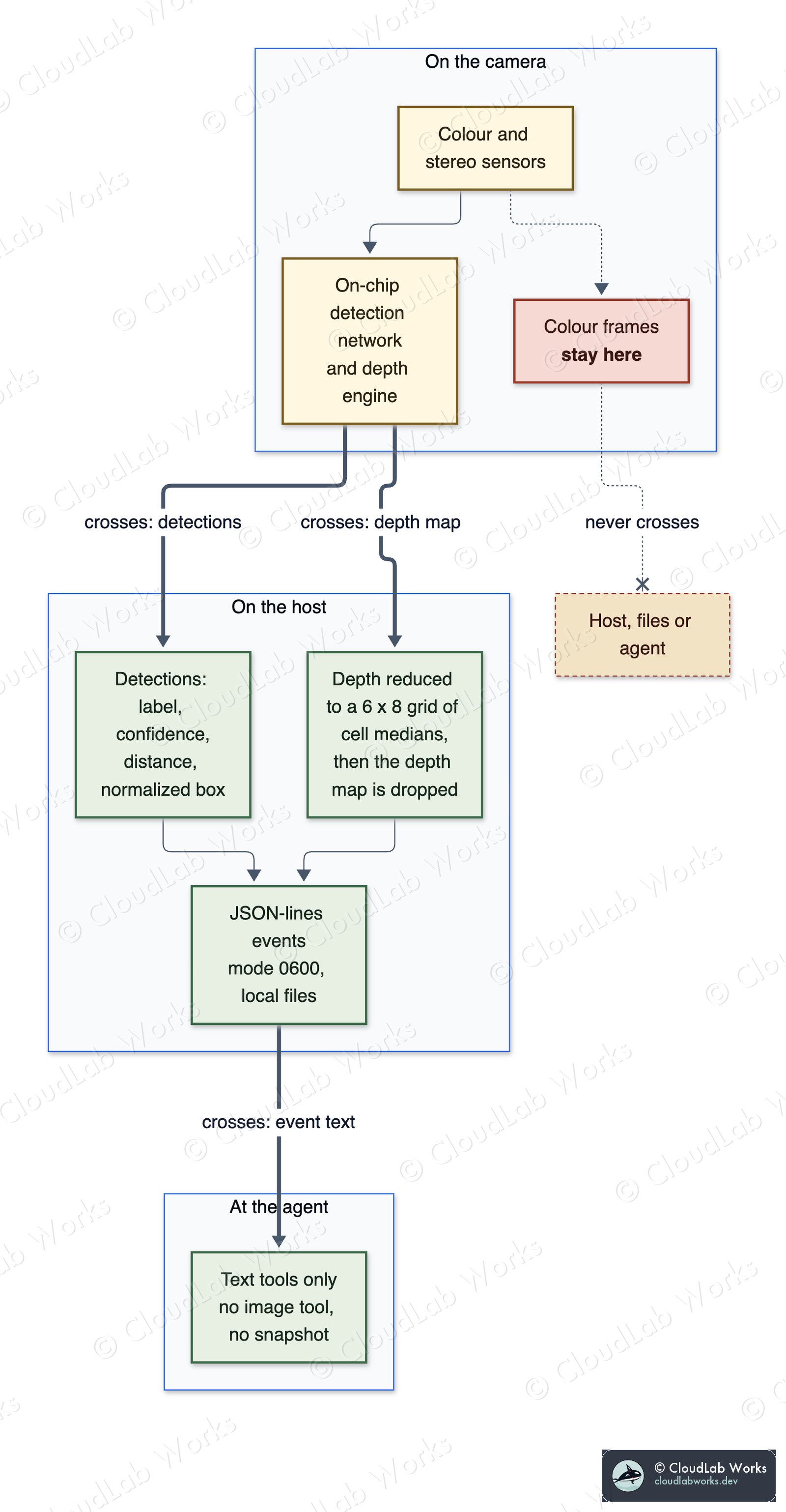
The defaults, stated so you can check them against the code:
- Colour frames stay on the camera. The colour sensor feeds the on-chip network. Those frames are never linked to a host output queue. Only two streams reach the host: detection results (label, confidence, distance, normalized box) and the stereo depth map.
- Depth maps are reduced and dropped. Each depth frame becomes a grid of cell medians, six by eight by default, held in memory and then discarded.
- Only JSON lines are written. A test scans the repository and a temporary run directory for image files, and the build fails if it finds one.
- Telemetry is off. DepthAI telemetry, crash-dump upload and auto-calibration are switched off before the library loads. One environment variable turns DepthAI's own defaults back on, and nothing else does.
- No model download at runtime. You fetch a detection model once and point the tool at the local file.
- There is no image tool. No snapshot command exists for an agent to call, because nothing in the code produces one.
Events still say something. They record when someone was present, for how long, how far from the camera, and when an object moved. Treat the event files as sensitive and keep them local.
When the cable comes out
A camera on a network drops sometimes. The tool finds the device by its id rather than an address, so a network change does not lose it. It keeps retrying discovery for a few minutes and asks the SDK to reconnect if the link drops, and the supervisor you run it under restarts it if it gives up. Every state change shows up as a camera event, so camera_health can tell an agent the difference between "quiet room" and "camera gone".
In a test, a pulled network cable recovered on its own in under a minute, without restarting the process.
What it does not do
- It does not send pictures to an agent, and it does not store them.
- It does not identify people. It reports that a person is there, not who.
- It does not read a scene. The agent learns about presence, position and change, not what an object is, unless you give the detector a model that names it.
- It does not run the camera for you. Run it under a supervisor that restarts it on exit.
- It has been tested live on one camera model, the OAK-D PoE. The USB OAK-D and the newer RVC4 cameras are expected to work and are untested. Reports are welcome.
- It is alpha: version 0.1.0.
oak-events is an independent community project. It is not affiliated with or endorsed by Luxonis. OAK and DepthAI are Luxonis trademarks, used to say which hardware and SDK it works with.
Try it
It is not on PyPI yet. Install from the GitHub repository:
uv tool install 'oak-events[camera,mcp] @ git+https://github.com/cloudlabworks/oak-events'

oak-events doctor
oak-events doctor checks the setup and works without a camera attached. Then fetch a detection model once, run the camera, and point an MCP client at the events directory. The README walks through each step, with a zones file and a client config.
- Repository: github.com/cloudlabworks/oak-events
- Release: v0.1.0
If you try it with a camera, I'd like to hear what it did on your hardware. Issues and pull requests are open.
Follow along
Get the next post without leaving this page: copy the feed into any reader, or get it by email. Live builds and the lab's music stream on Twitch.
 Ask Waku
Comments